
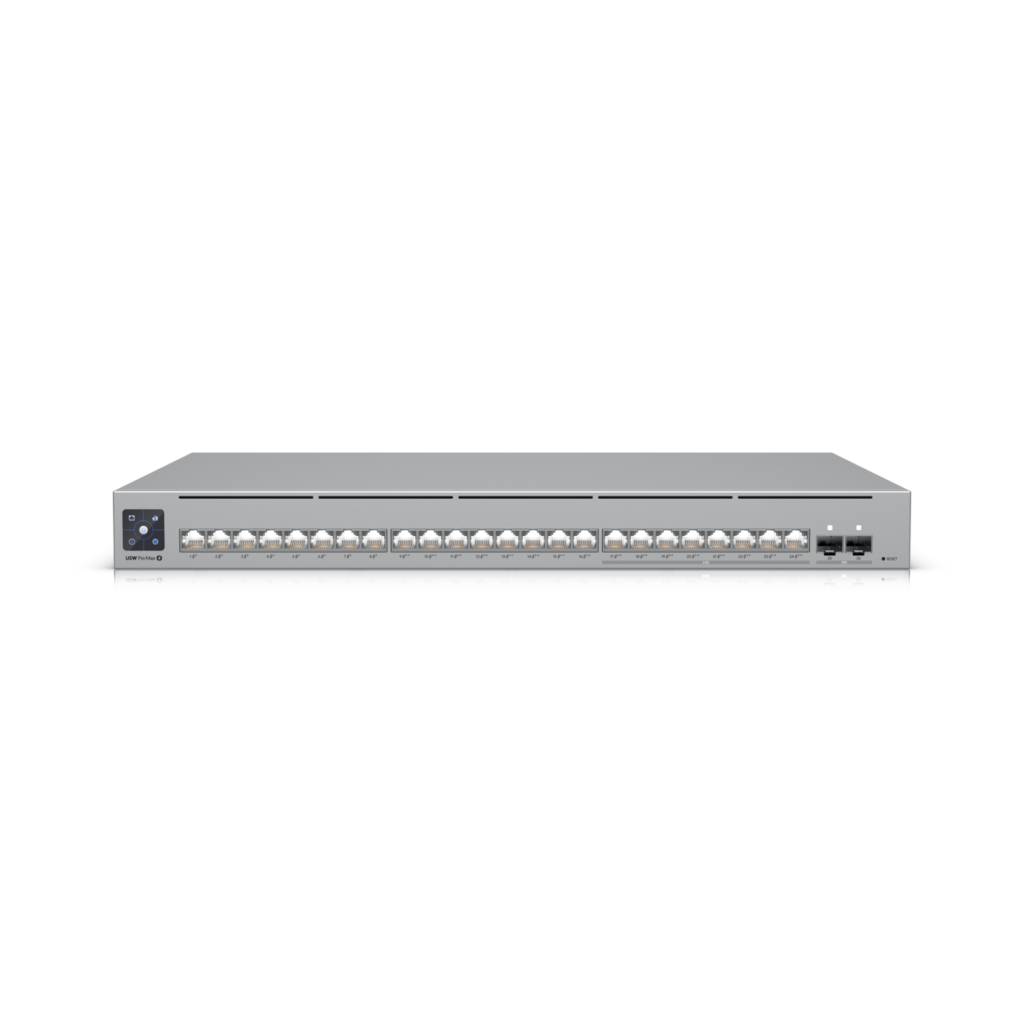
Ubiquiti USW Pro Max 24 PoE: Specs, Price, Pros & Cons
This review measures the Ubiquiti USW Pro Max 24 PoE against the full 22-spec sheet we track for Network Switches, comparing it like for like with the 2 other models in our database. It earns a VS Score of 74 out of 100 — the weighted result of every verified specification measured against the class average.
On the spec sheet it is strongest in performance and weakest in design & power. Its clearest single advantage over the class average: more 2.5G ports — 8 vs 2.67 (avg). Street prices currently start at $ 919.5 for the Ubiquiti USW Pro Max 24 PoE.
Category strengths
Where the Ubiquiti USW Pro Max 24 PoE beats the average
- More 2.5G ports ?8 vs 2.67 (avg)
- A much higher switching capacity ?112 Gbps vs 53.33 Gbps (avg)
- More SFP/SFP+ ports ?2 vs 0.67 (avg)
- More total ports ?24 vs 16 (avg)
- A much higher PoE budget ?400 W vs 219.33 W (avg)
- More PoE ports ?24 vs 16 (avg)
- A much higher forwarding rate ?83 Mpps vs 53.4 Mpps (avg)
- More gigabit ports ?16 vs 13.33 (avg)
- Has VLAN support ?
- Has cloud management ?
Where the Ubiquiti USW Pro Max 24 PoE trails the average
- No fanless ?
- A much higher power consumption ?450 W vs 249.77 W (avg)
Editor’s note
The USW Pro Max 24 PoE is what happens when someone at Ubiquiti asks why rack switches have looked the same for thirty years. Its party trick — Etherlighting — edge-lights all 24 ports with colors you assign by VLAN or network, so a glance at the rack tells you which port carries cameras and which carries guests. It sounds like a gimmick; anyone who has traced patch cables at arm's length in a closet will know it isn't.
The substance underneath is strong for $799. Sixteen gigabit ports plus eight 2.5 GbE ports, all 24 with PoE — and the sixteen from port 9 up are 802.3bt PoE++ at up to 60 W each, under a shared 400 W budget. Two SFP+ cages handle 10G uplinks. That mix comfortably powers a building's worth of Wi-Fi 7 access points, PTZ cameras and displays, which is precisely the deployment Ubiquiti has in mind. Switching capacity is 112 Gbps with a 16K MAC table, and the L3 side does inter-VLAN and static routing.
Know what you're signing up for. This is a UniFi device to its core: management happens through the UniFi Network application — a gateway, Cloud Key or self-hosted controller — and there is no standalone web UI, so as a lone switch in a non-UniFi network it makes little sense. The Layer 3 feature set stops at static routing; no OSPF or BGP. And it's an actively cooled 1U chassis rated to 450 W — Ubiquiti publishes no noise figure, so I would not park it on an open shelf in a quiet office and hope.
For an existing UniFi installation that needs serious PoE++ density with 2.5 GbE for modern APs, this is close to a default buy. Outside that ecosystem, TP-Link's Omada equivalents deliver similar port maps with a standalone UI.
Specifications
Quality bars are generated automatically against 2 other network switches.
Ports
The total number of Ethernet ports.
Ports running at 1 Gbps.
Multi-gig ports at 2.5 Gbps for fast NAS or Wi-Fi 6/7 access points.
Ports running at 10 Gbps.
Fibre uplink slots for long runs or 10G links.
Power over Ethernet
Ports that can power cameras, access points or phones over the cable.
The highest PoE standard supported; later delivers more power per port.
The total power available across all PoE ports.
Performance
The total internal bandwidth; enough capacity keeps every port at full speed.
How many packets per second the switch can process.
How many devices the switch can track (thousands of entries).
Larger frames improve throughput for NAS and backup traffic.
Management
Unmanaged switches are plug-and-play; managed ones add VLANs, monitoring and control.
Segment the network into isolated virtual LANs.
Combines ports into one faster trunk connection.
Prioritises voice and video traffic.
Keeps multicast streams (IPTV, cameras) from flooding every port.
Manage the switch remotely through a cloud controller (e.g. Omada, UniFi).
Design & power
No fan means silent operation for desks and living rooms.
A metal case dissipates heat better and lasts longer.
Fits a standard 19-inch equipment rack.
Maximum power draw; lower costs less to run 24/7.
How the VS Score works — and what it can’t tell you
Every measurable spec is scored against the average of all the Network Switches we track: matching the class average scores 50, clearly beating it climbs towards 100, and each spec counts according to an editorial weight that reflects real-world impact — a battery-capacity gap moves the score far more than a colour-options list. The quality bars on the spec cards above show where this model sits inside the full range for its class, and the overall VS Score rolls every weighted result into one number.
Unknown values are never estimated. A spec this product doesn’t report simply drops out of its scoring — it isn’t penalised with a guess — but a thinner spec sheet does mean a score built on fewer data points, which is why completeness is disclosed under About this data.
Most importantly: a spec-sheet lead is not the same as a better product. Megapixels, gigahertz and benchmark points describe capacity, not experience — image processing, software optimisation, thermals, haptics and ergonomics decide how a device actually feels, and no table captures reliability or long-term support quality. Treat the VS Score as a structured summary of what can be measured, not a substitute for your own priorities.
About this data
- Specifications are compiled from each manufacturer’s official spec sheet, cross-checked against trusted specification databases, and normalised into one schema so identical things are compared identically.
- Specifications last verified August 20, 2026.
- Data completeness: 22 of the 22 specs in this category are verified (100%). Anything we could not verify is shown as Unknown — never estimated — and is excluded from the score.
- Prices and availability come from live retailer feeds via our shopping partners and refresh throughout the day; a missing price means no partner currently lists the product, not that it is discontinued.
- Want the full picture? Our editorial guidelines explain how we research products, weight the scores and stay independent.
- Spotted an error in a spec? Tell us and we will correct the sheet.
Where to buy
Prices and availability may change. Check the retailer before buying. We may earn a commission on purchases.
Price history
Network Switches with similar specs to the Ubiquiti USW Pro Max 24 PoE
Ratings & reviews
No reviews yet. Be the first to share your experience.
The bottom line
The Ubiquiti USW Pro Max 24 PoE earns a VS Score of 74, putting it among the very best of the 3 network switches we compare here.
- Who it’s for
- Existing UniFi deployments that need PoE++ density: 16 ports at up to 60 W plus eight 2.5GbE ports under a 400 W budget powers a building of Wi-Fi 7 APs and PTZ cameras, and Etherlighting's color-coded ports genuinely help in a busy rack.
- Who should look elsewhere
- Non-UniFi networks — there's no standalone web UI, so without a UniFi controller it's a very pretty unmanaged switch. Also skip it if you need dynamic routing (OSPF/BGP) or a silent unit for an open shelf: it's actively cooled with no published noise figure.
- The trade-off that matters
- Ecosystem lock for ecosystem polish: the $799 price is genuinely strong for the port map, but every management function assumes UniFi Network — the switch is only as good as the system around it.
- The main alternative
- TP-Link Omada SG3428XPP-M2 — a comparable 2.5G PoE++ port map with a standalone web UI, the sensible pick outside the UniFi world.
The VS Score is generated automatically from the weighted specifications above, measured against all other network switches in our database. Treat it as a shortlisting guide — not a substitute for your own priorities.