Omada by TP-Link Fusion 2.5G: Specs, Features, Pros & Cons
There is no wireless radio in the Fusion 2.5G at all. It is a wired gateway, sitting between the incoming connection and the rest of the network, doing routing, firewalling and VPN work while wireless coverage remains somebody else's job: a separate access point, or whatever is already installed. Anyone hoping to replace a home router with a single box should stop here.
For the job it does do, the published figures are unusually candid. TP-Link states throughput with intrusion prevention switched on and a separate figure for encrypted VPN traffic, alongside the raw routing number. That makes it far easier to size against a real connection, because the routing figure is the one that falls once security features are enabled.
The port arrangement is flexible: several sockets can act as either WAN or LAN, so multiple incoming connections with automatic failover are possible, and multi-gig is supported on the LAN side. There is a substantial amount of memory for the class, site-to-site VPN for linking offices, and no subscription attached to the security features.
Nothing exceeds 2.5 Gigabit and there are no fiber sockets, so a very fast business connection will outrun it.
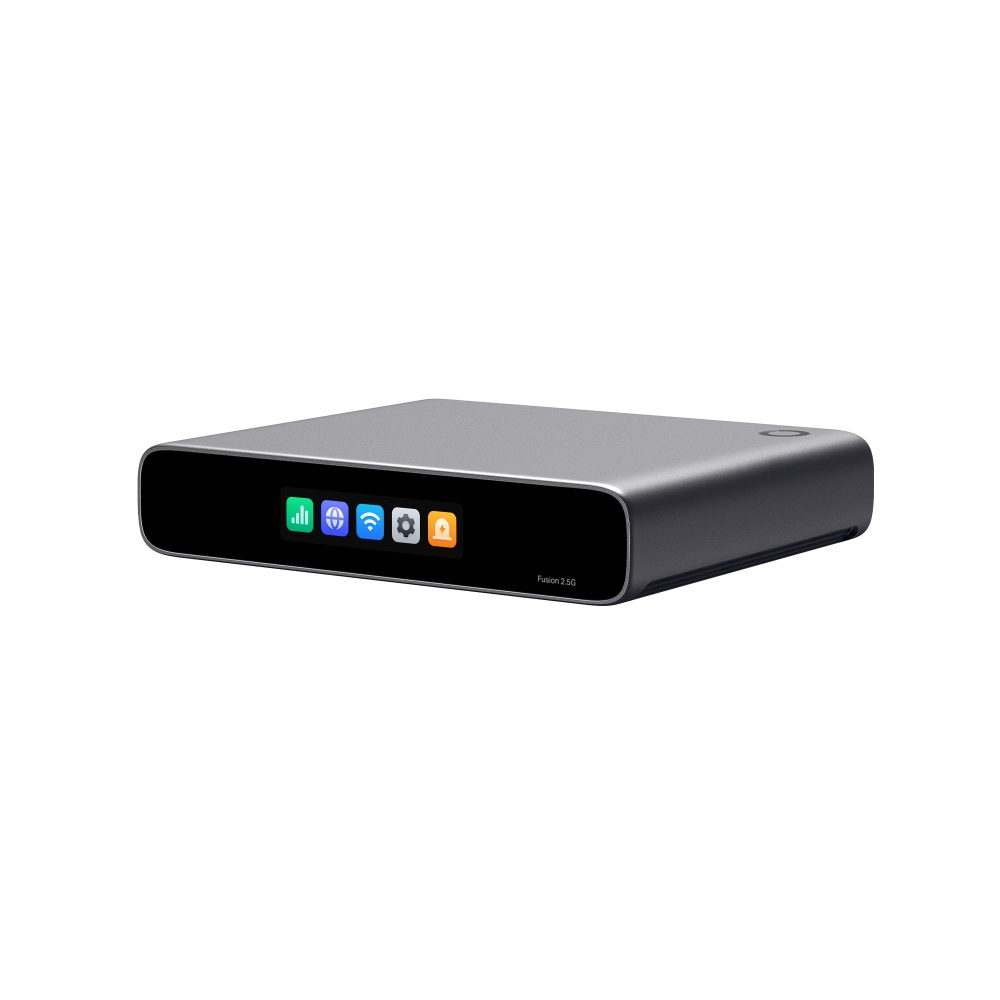
The box itself is small, silent and fanless, and it goes on a wall or in a rack with a magnetic plate or rack kit that TP-Link sells separately. There are two hardware versions, and TP-Link's US support page lists only the second, V2.
How this VS Score was computed
Score 0: each known spec is measured against the median of all wired gateways (2 products), then weighted; 50 means level with that median. In classes of six or more, a value beyond the class’s 10th–90th percentile range counts as that limit, so one extreme product cannot set the scale. 0% of the scoreable weight could be used; unknown values, features not applicable to this class and proxies (battery capacity where a rated life exists) add or remove nothing.
Not scored: WAN port speed (too few comparable peers (2, need 3)); WAN ports (too few comparable peers (2, need 3)); LAN ports (too few comparable peers (2, need 3)); Multi-gig LAN (too few comparable peers (2, need 3)); SFP/SFP+ ports (too few comparable peers (2, need 3)); PoE ports (too few comparable peers (1, need 3)); Link aggregation (too few comparable peers (2, need 3)); USB ports (too few comparable peers (1, need 3)); Routing throughput (too few comparable peers (1, need 3)); Threat-protection throughput (too few comparable peers (2, need 3)); VPN throughput (too few comparable peers (1, need 3)); Concurrent sessions (too few comparable peers (1, need 3)); Processor cores (too few comparable peers (2, need 3)); RAM (too few comparable peers (2, need 3)); Intrusion prevention (too few comparable peers (2, need 3)); Built-in security suite (too few comparable peers (2, need 3)); VPN server (too few comparable peers (2, need 3)); Site-to-site VPN (too few comparable peers (2, need 3)); Dual-WAN failover (too few comparable peers (2, need 3)); VLAN support (too few comparable peers (2, need 3)); Quality of Service (QoS) (too few comparable peers (2, need 3)); Cloud management (too few comparable peers (2, need 3)); App control (too few comparable peers (2, need 3)); Subscription required (too few comparable peers (2, need 3)); Fanless (too few comparable peers (1, need 3)).
Editor’s note
TP-Link publishes 2,183 Mbps of throughput with intrusion prevention switched on and 1,023 Mbps over IPsec, which are the numbers that count for a gateway bought for its security features. Five 2.5G ports, of which up to four can be WAN, means dual-ISP failover or load balancing without an add-on. Behind them sit a quad-core CPU with 2 GB of DDR4, a fanless polycarbonate body at 535 g, and a small color touchscreen on the front that shows status without a laptop.
For me the built-in controller and the absence of a license outweigh the throughput figures. Omada cloud management, multi-site views, VLANs, ACLs, content filtering and IDS/IPS are all here with no subscription, while several better-known prosumer gateways keep part of their security features behind one.
TP-Link lists OpenVPN at only 223 Mbps and WireGuard at 605 Mbps, so if your VPN client of choice is OpenVPN, plan around that lower ceiling. And there is no SFP cage and no PoE, so a 10G uplink or powering an access point both need another device.
Specifications
Quality bars show where each figure sits between the lowest and highest of the 2 wired gateways this VS Score is measured against.
Ports & wired
Performance
Security & management
Design
Networking assessment
What the specification table does not say on its own: what this device needs to connect, what speeds are realistic, what costs extra, and where it falls short. Every statement below is read from the verified sheet or written by an editor — nothing is estimated.
Test environment
Research-based assessment: this brief is derived from the manufacturer’s published specifications for the Omada by TP-Link Fusion 2.5G and the documents listed under Sources and verification. We have not run this unit on our own network, so nothing here is a measurement of ours.
Connection requirements
The WAN (internet) port is rated at 2.5 Gbps. An internet plan faster than that is capped at the router, and nothing on the network can download faster than this port regardless of the wireless figures.
There are 4 LAN ports, at least one of them multi-gig, so one wired device can run above Gigabit speed.
Throughput expectations
Plain routing is rated at 2,361 Mbps.
With threat protection (deep packet inspection) switched on, throughput drops to 2,183 Mbps — the figure to plan around if you intend to use it.
VPN throughput is rated at 1,023 Mbps.
Firmware and subscriptions
The Fusion 2.5G runs its own Omada controller, so the gateway and every Omada switch and access point it adopts are updated from the same place, through the Omada app or the web interface. TP-Link posts firmware with a release note on the Omada support site. Version 1.0.10 (build 20260814, posted August 28, 2026) for hardware v2.0 and v2.6 bundles controller 6.3.14.2, tunes DPI and IPS performance and tightens management authentication. That release also warns the upgrade cannot be rolled back, and the centralized firmware module and auto-upgrade are unavailable for now, so updates are applied by hand from the device list. Cloud management carries no license fee.
A built-in security suite is on the spec sheet. On most brands the full version is a paid subscription after a trial; check the manufacturer’s page linked under Sources for the current terms.
Set-up and day-to-day management run through the manufacturer’s cloud service, so that account’s availability and privacy terms are part of the product.
VPN support is built in, which avoids a subscription to a third-party VPN router service for remote access.
Security support
Intrusion prevention is built in; on gateways this is the function most affected by the threat-protection throughput figure above.
VLAN support allows work, IoT and guest traffic to be separated on the wired side.
Security-update cadence is not something manufacturers publish as a specification; see Support and updates below.
Known limitations
Not offered, according to the spec sheet: link aggregation, metal housing.
Support and updates
Support runs through support.omadanetworks.com, which carries the datasheet, release notes, firmware downloads, configuration guides and an emulator for the controller, plus a case portal, phone support and a community forum. Check the hardware version on the label before downloading anything: the US page lists only V2.60, and TP-Link says model and version availability varies by region.
Sources and verification
Where the specifications come from
- Official product pageomadanetworks.com
- Datasheet or manualstatic.tp-link.com
- Support and firmware documentationstatic.tp-link.com
Verification
- First published
- Specifications last checked
- Sheet completeness
- 29 of 29 specifications verified; the rest show as Unknown and are never estimated or scored
- Page type
- Product specification page — Compiled from the manufacturer’s published specifications and the cited sources; this is not a hands-on test.
- Basis
- Research-based: specifications and editorial text were compiled from the documents listed here and the manufacturer’s published data. We have not tested this unit ourselves; where independent measurements are mentioned they belong to the linked publication.
Ratings & reviews
No reviews yet. Be the first to share your experience.
The bottom line
- Who it’s for
- Small offices and serious home networks that already have, or will buy, separate access points, and want dual-ISP failover, VLANs and intrusion prevention without a subscription.
- Who should look elsewhere
- Anyone expecting a router in the usual sense. It has no Wi-Fi at all, no PoE to power an access point, and no SFP cage for a 10G uplink, and each of those means another device on the shelf.
- The trade-off that matters
- Published throughput with security enabled and no subscription, against a feature set that stops at 2.5G copper: five ports, no fiber, no PoE, and OpenVPN running at under half the WireGuard rate and about a fifth of the IPsec rate.
- The main alternative
- Ubiquiti UniFi Cloud Gateway Fiber: the closest rival in the same role, with two 10G SFP+ ports, a 10G RJ45 and four 2.5G ports behind it. Base management is free, though Ubiquiti's expanded threat-signature set (CyberSecure) is a paid add-on, and it pulls you into the UniFi ecosystem instead of Omada's.
The VS Score is calculated from the weighted specifications above, each measured against the median of comparable wired gateways — a shortlisting guide, not a substitute for your own priorities. See how we score.