Zyxel GS1100-16ES: Specs, Features, Pros & Cons
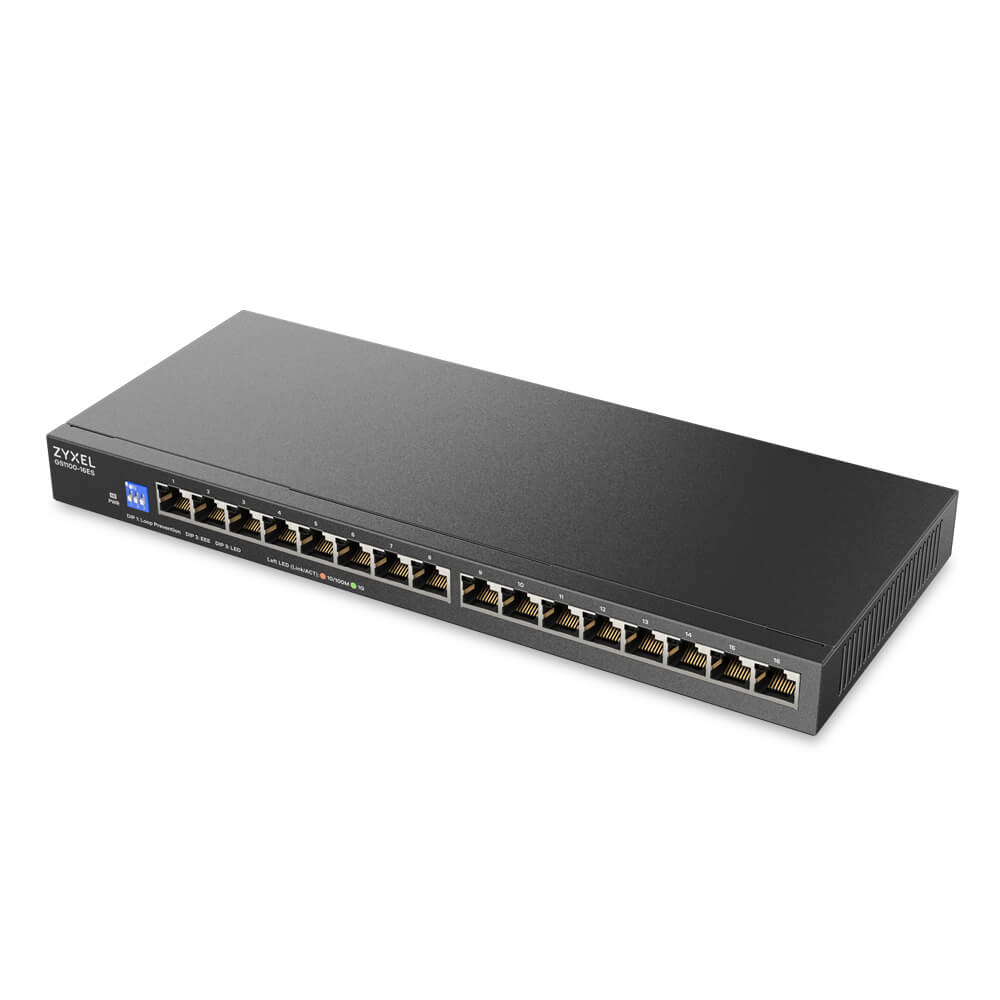
Three DIP switches on the front panel are the whole user interface of the GS1100-16ES. The first turns on loop prevention, the second Energy Efficient Ethernet, and the third switches the port LEDs off, which is welcome when the switch lives in a bedroom closet or under a TV.
Zyxel sells four models in this GS1100 Switchable Series, and the 16ES is the slim one: 26 mm tall and 286 mm wide, with sixteen gigabit ports. It ships with a wall-mount kit and no rack ears. The deeper GS1100-16S is the version with a rack kit, and the GS1100-16EPS adds PoE+ to the same slim case, so the three are easy to confuse in a retail listing.
The fabric handles all sixteen ports at full duplex at once, jumbo frames up to 12 KB pass through, and there is no fan, so Zyxel rates the noise at 0 dBA. Power comes from a mains cord straight into the case, with no adapter brick to lose behind a cabinet, and Zyxel rates that input for 4 kV line-to-ground surges, twice the figure it gives the rack-kit GS1100-16S.
Every port is gigabit, so a NAS or access point with a 2.5G port will link at 1 Gbps. There is no PoE, no VLAN, no link aggregation and no way to see traffic, and the DIP switches cannot change any of that.
Category strengths
Where the Zyxel GS1100-16ES beats the median
- More gigabit ports ?16 vs 0 (median)
- More total ports ?16 vs 10 (median)
- A much lower power consumption ?8.53 W vs 26.5 W (median)
Where the Zyxel GS1100-16ES trails the median
- Fewer PoE ports ?0 vs 4 (median)
- No VLAN support ?
- No link aggregation ?
- No Quality of Service (QoS) ?
- A lower switching capacity ?32 Gbps vs 40 Gbps (median)
- No IGMP snooping ?
- A lower forwarding rate ?23.8 Mpps vs 32.73 Mpps (median)
- No cloud management ?
How this VS Score was computed
Score 43: each known spec is measured against the median of all network switches (17 products), then weighted; 50 means level with that median. In classes of six or more, a value beyond the class’s 10th–90th percentile range counts as that limit, so one extreme product cannot set the scale. 85% of the scoreable weight could be used; unknown values, features not applicable to this class and proxies (battery capacity where a rated life exists) add or remove nothing.
| Specification | This product | Cohort median | Score weight | Points moved |
|---|---|---|---|---|
| Gigabit ports | 16 | 0 | 1.5 | +75.0 |
| Total ports | 16 | 10 | 2 | +60.0 |
| PoE ports | 0 | 4 | 1.2 | −57.6 |
| VLAN support | No | 59% of the class have it | 0.8 | −38.4 |
| PoE standard | None | PoE+ (802.3at) | 0.8 | −26.4 |
| Management level | Unmanaged | Smart managed | 1 | −25.0 |
| Power consumption | 8.53 | 26.5 | 0.5 | +25.0 |
| Link aggregation | No | 53% of the class have it | 0.5 | −24.0 |
| Quality of Service (QoS) | No | 62% of the class have it | 0.5 | −24.0 |
| Cloud management | No | 50% of the class have it | 0.4 | −19.2 |
| Switching capacity | 32 | 40 | 1.5 | −15.0 |
| IGMP snooping | No | 60% of the class have it | 0.3 | −14.4 |
| Rack-mountable | No | 35% of the class have it | 0.3 | −14.4 |
| Forwarding rate | 23.8 | 32.73 | 0.8 | −11.2 |
| 2.5G ports | 0 | 0 | 1 | +0.0 |
| 10G ports | 0 | 0 | 0.8 | +0.0 |
| SFP/SFP+ ports | 0 | 0 | 0.5 | +0.0 |
| MAC address table | 16 | 16 | 0.3 | +0.0 |
Not scored: PoE budget (unknown: not scored); Jumbo frame support (standard for the class (100% have it)); Fanless (standard for the class (80% have it)); Metal housing (unknown: not scored).
Editor’s note
Plug both ends of one patch cable into the same unmanaged switch, or join two wall jacks with a stray cable, and the broadcast loop can stall every device on the network. DIP switch 1 turns on Zyxel's loop prevention, which is the reason to pick this over an unmanaged switch without it. In a house where someone else will eventually plug things in, I would leave it on from day one.
Zyxel rates the 16ES at 2.21 W with nothing connected and 8.53 W with every port at full load, and with Energy Efficient Ethernet enabled the idle links draw less again. Left running all year at full load it would use about 75 kWh, so running cost is not part of the decision.
What it cannot do is the more useful part of the decision. Smart TVs, cameras and guest devices end up on the same flat network as the NAS and the work laptop, because an unmanaged switch has no VLANs. If the router already separates them per port, that is fine. If it does not, a small managed switch such as NETGEAR's GS105EPP family is the better buy.
Zyxel's own GS1100-24ES is the sibling to compare. It keeps the same DIP switches, adds eight ports and puts a rack-mounting kit in the box, at the cost of a taller case.
A 2.5G NAS or Wi-Fi 7 access point plugged in here will run at a gigabit, and there is no faster uplink port to carry several of them back to the router. For a wiring cabinet that will gain fast devices over the next few years, that is the line to read twice.
Specifications
Quality bars show where each figure sits between the lowest and highest of the 17 network switches this VS Score is measured against.
Ports
Power over Ethernet
Performance
Management
Design & power
Networking assessment
What the specification table does not say on its own: what this device needs to connect, what speeds are realistic, what costs extra, and where it falls short. Every statement below is read from the verified sheet or written by an editor — nothing is estimated.
Test environment
Research-based assessment: this brief is derived from the manufacturer’s published specifications for the Zyxel GS1100-16ES and the documents listed under Sources and verification. We have not run this unit on our own network, so nothing here is a measurement of ours.
Connection requirements
Unmanaged: it plugs into any router’s LAN port and needs no configuration, but it also offers none — no VLANs, no port monitoring.
Ports: 16 in total, of which 16 are Gigabit.
Throughput expectations
Switching capacity is 32 Gbps, enough for every port to run flat out at once — the usual case for a home or small-office switch.
Jumbo frames are supported, which helps large file transfers between NAS and desktop.
Security support
Security-update cadence is not something manufacturers publish as a specification; see Support and updates below.
Known limitations
Not offered, according to the spec sheet: vLAN support, link aggregation, quality of Service (QoS), cloud management.
2 specifications are not published by the manufacturer and are shown as Unknown rather than guessed.
Support and updates
We have not found a published firmware support-lifetime commitment for this model. Update policies differ widely between brands; check the support page linked under Sources and verification before relying on it for a long deployment, and treat a device that has stopped receiving security updates as due for replacement.
Sources and verification
Verification
- First published
- Specifications last checked
- Sheet completeness
- 20 of 22 specifications verified; the rest show as Unknown and are never estimated or scored
- Page type
- Product specification page — Compiled from the manufacturer’s published specifications and the cited sources; this is not a hands-on test.
- Basis
- Research-based: specifications and editorial text were compiled from the documents listed here and the manufacturer’s published data. We have not tested this unit ourselves; where independent measurements are mentioned they belong to the linked publication.
Network Switches with similar specs to the Zyxel GS1100-16ES
Ratings & reviews
No reviews yet. Be the first to share your experience.
The bottom line
The Zyxel GS1100-16ES earns a VS Score of 43, below the median of the 17 network switches it is measured against (a score of 50 is level with that median).
- Who it’s for
- A house with a structured-wiring cabinet, or a small office, that has outgrown an eight-port switch and wants sixteen silent gigabit ports with loop protection and nothing to configure.
- Who should look elsewhere
- Anyone who needs PoE (that is the GS1100-16EPS), VLANs to keep cameras and guests apart, or rack mounting, since this slim model ships with a wall kit only.
- The trade-off that matters
- The DIP switches are all the control there is. Loop prevention and dark LEDs take a second to set, while separating guest or camera traffic is impossible on this switch.
- The main alternative
- Zyxel GS1100-24ES: the same DIP-switch controls with 24 ports and a rack-mounting kit in the box.
The VS Score is calculated from the weighted specifications above, each measured against the median of comparable network switches — a shortlisting guide, not a substitute for your own priorities. See how we score.