NETGEAR XS508Mv2: Specs, Features, Pros & Cons
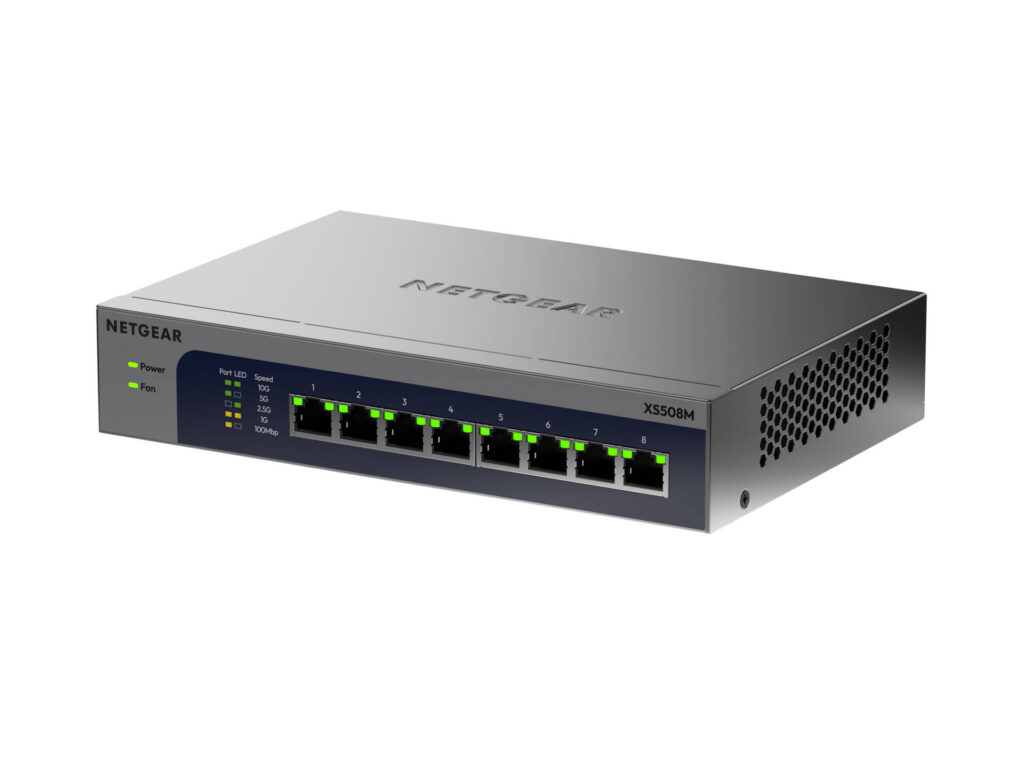
NETGEAR's second XS508M drops the fiber port. The original had seven 10G copper ports and an eighth that could take an SFP+ module instead, while the XS508Mv2 has eight RJ45 ports and no cage at all, in a case that shrinks from 328 mm wide to 210 mm.
Every port negotiates 10G, 5G, 2.5G, 1G or 100M on its own, so a 10G NAS, a 5G workstation card and a 2.5G access point each run at their own top speed through the same box. The fabric is non-blocking at 160 Gbps, which covers all eight ports in both directions at once. There is no web page, no login and, according to the datasheet, no firmware to update.
The case is all metal, cooled by a single low-noise fan, and NETGEAR rates it for rooms up to 50 degrees Celsius, where Zyxel's GS1100 series, for one, stops at 40. It stands on a desk or hangs on a wall. One identification detail trips people up: the chassis still reads XS508M, and the v2 is told apart by its part number, XS508M-200NAS in North America.
Being unmanaged sets the rest. There is no PoE, no VLAN and no link aggregation. The switch honors 802.1p and DSCP priority tags with eight queues, but nothing about that can be adjusted, and without an SFP+ cage any fiber or DAC link needs a media converter or a different switch.
Category strengths
Where the NETGEAR XS508Mv2 beats the median
- More 10G ports ?8 vs 0 (median)
Where the NETGEAR XS508Mv2 trails the median
- Fewer PoE ports ?0 vs 4 (median)
- No VLAN support ?
- No fanless ?
- No link aggregation ?
- Fewer total ports ?8 vs 10 (median)
- A much higher power consumption ?39 W vs 26.5 W (median)
- No cloud management ?
How this VS Score was computed
Score 34: each known spec is measured against the median of all network switches (17 products), then weighted; 50 means level with that median. In classes of six or more, a value beyond the class’s 10th–90th percentile range counts as that limit, so one extreme product cannot set the scale. 74% of the scoreable weight could be used; unknown values, features not applicable to this class and proxies (battery capacity where a rated life exists) add or remove nothing.
| Specification | This product | Cohort median | Score weight | Points moved |
|---|---|---|---|---|
| PoE ports | 0 | 4 | 1.2 | −57.6 |
| 10G ports | 8 | 0 | 0.8 | +40.0 |
| VLAN support | No | 59% of the class have it | 0.8 | −38.4 |
| Fanless | No | 80% of the class have it | 0.7 | −33.6 |
| PoE standard | None | PoE+ (802.3at) | 0.8 | −26.4 |
| Management level | Unmanaged | Smart managed | 1 | −25.0 |
| Quality of Service (QoS) | Yes | 62% of the class have it | 0.5 | +25.0 |
| Link aggregation | No | 53% of the class have it | 0.5 | −24.0 |
| Total ports | 8 | 10 | 2 | −20.0 |
| Cloud management | No | 50% of the class have it | 0.4 | −19.2 |
| Rack-mountable | No | 35% of the class have it | 0.3 | −14.4 |
| Power consumption | 39 | 26.5 | 0.5 | −8.0 |
| Gigabit ports | 0 | 0 | 1.5 | +0.0 |
| 2.5G ports | 0 | 0 | 1 | +0.0 |
| SFP/SFP+ ports | 0 | 0 | 0.5 | +0.0 |
| MAC address table | 16 | 16 | 0.3 | +0.0 |
Not scored: PoE budget (unknown: not scored); Switching capacity (unknown: not scored); Forwarding rate (unknown: not scored); Jumbo frame support (standard for the class (100% have it)); IGMP snooping (unknown: not scored); Metal housing (standard for the class (87% have it)).
Editor’s note
NETGEAR gives the XS508Mv2 a maximum draw of about 39 W, roughly three times what Zyxel lists for its 24-port gigabit GS1100-24ES. Copper 10G is power-hungry, and that heat is why this switch has a fan while Tenda's eight-port 2.5G TEM2008D gets by without one. NETGEAR's acoustic figure is 29.97 dB at 25 degrees Celsius, which is quiet for a fan but not silent, so a bedroom or a recording space is the wrong place for it.
The right place is a desk or closet where several devices already have 10G or multi-gig copper ports: a NAS with a 10GBASE-T card, a workstation, a Wi-Fi 7 access point with a 5G or 10G uplink. Each gets its full link with nothing to set up, and the non-blocking fabric means a big copy between the NAS and the workstation does not slow the access point.
Owners of the first XS508M should note what the redesign took away. A NAS with an SFP+ card, or a 10G fiber run to another room, plugged straight into the old combo port. On the v2 it needs an RJ45 SFP+ module at the far end or a converter, which adds cost and heat.
The support terms are better than the hardware alone suggests: a limited lifetime hardware warranty and 90 days of round-the-clock technical support, against two years of warranty on QNAP's managed 24-port 10G switch. For an eight-port 10G switch with no software to go stale, that warranty is the strongest reason to pick this one over a no-name 10G switch.
Specifications
Quality bars show where each figure sits between the lowest and highest of the 17 network switches this VS Score is measured against.
Ports
Power over Ethernet
Performance
Management
Design & power
Networking assessment
What the specification table does not say on its own: what this device needs to connect, what speeds are realistic, what costs extra, and where it falls short. Every statement below is read from the verified sheet or written by an editor — nothing is estimated.
Test environment
Research-based assessment: this brief is derived from the manufacturer’s published specifications for the NETGEAR XS508Mv2 and the documents listed under Sources and verification. We have not run this unit on our own network, so nothing here is a measurement of ours.
Connection requirements
Unmanaged: it plugs into any router’s LAN port and needs no configuration, but it also offers none — no VLANs, no port monitoring.
Ports: 8 in total, of which an unspecified number are Gigabit and 8 are 10 Gigabit.
Throughput expectations
Jumbo frames are supported, which helps large file transfers between NAS and desktop.
Security support
Security-update cadence is not something manufacturers publish as a specification; see Support and updates below.
Known limitations
Not offered, according to the spec sheet: vLAN support, fanless, link aggregation, cloud management.
4 specifications are not published by the manufacturer and are shown as Unknown rather than guessed.
Support and updates
We have not found a published firmware support-lifetime commitment for this model. Update policies differ widely between brands; check the support page linked under Sources and verification before relying on it for a long deployment, and treat a device that has stopped receiving security updates as due for replacement.
Sources and verification
Where the specifications come from
- Official product pagenetgear.com
- Datasheet or manualdownloads.netgear.com
Verification
- First published
- Specifications last checked
- Sheet completeness
- 18 of 22 specifications verified; the rest show as Unknown and are never estimated or scored
- Page type
- Product specification page — Compiled from the manufacturer’s published specifications and the cited sources; this is not a hands-on test.
- Basis
- Research-based: specifications and editorial text were compiled from the documents listed here and the manufacturer’s published data. We have not tested this unit ourselves; where independent measurements are mentioned they belong to the linked publication.
Network Switches with similar specs to the NETGEAR XS508Mv2

Ratings & reviews
No reviews yet. Be the first to share your experience.
The bottom line
The NETGEAR XS508Mv2 earns a VS Score of 34, below the median of the 17 network switches it is measured against (a score of 50 is level with that median).
- Who it’s for
- A home studio or small office with a 10G NAS, a workstation or two and a fast access point, all on copper, where nobody wants to manage a switch.
- Who should look elsewhere
- Anyone with SFP+ cards or fiber runs, since there is no cage now, anyone who needs PoE or VLANs, and anyone who wanted a silent desk switch: it has a fan.
- The trade-off that matters
- No management is the selling point and the limit. The switch passes priority tags along but cannot be told what to prioritize or what to keep apart.
- The main alternative
- Ubiquiti USW Pro XG 8 PoE: eight 10G ports that also supply PoE++, VLANs and a fanless case, for a UniFi network willing to run a controller.
The VS Score is calculated from the weighted specifications above, each measured against the median of comparable network switches — a shortlisting guide, not a substitute for your own priorities. See how we score.