QNAP QSW-M3224-24T: Specs, Features, Pros & Cons
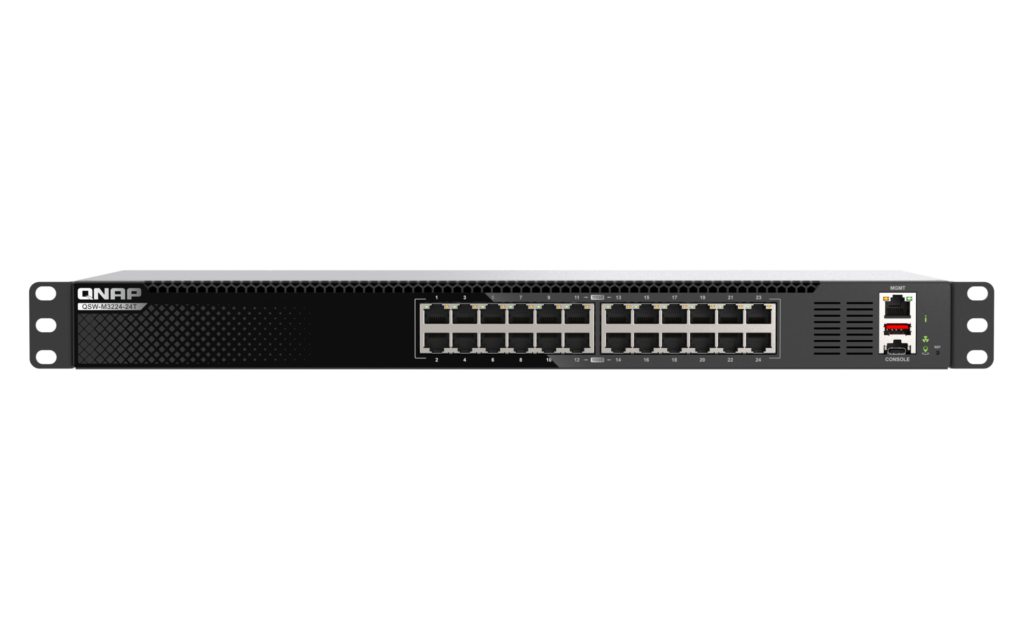
Two QSW-M3224-24T switches can be paired with MC-LAG, so a server with two network ports can run one link to each switch and keep working when either switch fails or reboots for a firmware update. QNAP builds that into a 1U switch with twenty-four 10GBASE-T copper ports and not a single SFP+ cage.
Every port negotiates 10G, 5G, 2.5G, 1G or 100M, so a rack can mix 10G NAS units and servers with 2.5G workstations and older gigabit gear. Switching capacity is 480 Gbps, enough for all twenty-four ports at full duplex at once, and a separate gigabit management port and a USB-C console keep administration off the data ports.
QNAP calls the software L3 Lite, and the label is accurate. Its QSS Pro web interface handles 802.1Q VLANs, LACP for up to 20 Gbps over two ports, ACLs, IGMP snooping with a querier, QoS by port, CoS, DSCP or ToS, SNMP, and Precision Time Protocol for AV-over-IP and timing-sensitive gear. On the Layer 3 side it lists static routing and a DHCP server, with no dynamic routing protocol. QNAP's AMIZcloud service can monitor switches across several sites without extra hardware.
All of that runs on copper, which draws power. QNAP rates the maximum at 116.9 W from an internal supply, and five PWM fans cool the chassis. QNAP calls it near-silent at full load but publishes no noise figure. At 190 mm deep it fits shallow network cabinets, though the fans make it a cabinet or closet switch and not a desk one.
Category strengths
Where the QNAP QSW-M3224-24T beats the median
- A much higher switching capacity ?480 Gbps vs 40 Gbps (median)
- More total ports ?24 vs 10 (median)
- More 10G ports ?24 vs 0 (median)
- Has rack-mountable ?
- Has cloud management ?
Where the QNAP QSW-M3224-24T trails the median
- A much higher power consumption ?116.9 W vs 26.5 W (median)
- Fewer PoE ports ?0 vs 4 (median)
- No fanless ?
How this VS Score was computed
Score 67: each known spec is measured against the median of all network switches (17 products), then weighted; 50 means level with that median. In classes of six or more, a value beyond the class’s 10th–90th percentile range counts as that limit, so one extreme product cannot set the scale. 85% of the scoreable weight could be used; unknown values, features not applicable to this class and proxies (battery capacity where a rated life exists) add or remove nothing.
| Specification | This product | Cohort median | Score weight | Points moved |
|---|---|---|---|---|
| Total ports | 24 | 10 | 2 | +100.0 |
| Switching capacity | 480 — capped at the class’s upper range (200) | 40 | 1.5 | +75.0 |
| PoE ports | 0 | 4 | 1.2 | −57.6 |
| 10G ports | 24 — capped at the class’s upper range (8) | 0 | 0.8 | +40.0 |
| VLAN support | Yes | 59% of the class have it | 0.8 | +40.0 |
| Fanless | No | 80% of the class have it | 0.7 | −33.6 |
| PoE standard | None | PoE+ (802.3at) | 0.8 | −26.4 |
| Management level | Fully managed | Smart managed | 1 | +25.0 |
| Link aggregation | Yes | 53% of the class have it | 0.5 | +25.0 |
| Quality of Service (QoS) | Yes | 62% of the class have it | 0.5 | +25.0 |
| Cloud management | Yes | 50% of the class have it | 0.4 | +20.0 |
| Power consumption | 116.9 | 26.5 | 0.5 | −19.5 |
| IGMP snooping | Yes | 60% of the class have it | 0.3 | +15.0 |
| Rack-mountable | Yes | 35% of the class have it | 0.3 | +15.0 |
| Gigabit ports | 0 | 0 | 1.5 | +0.0 |
| 2.5G ports | 0 | 0 | 1 | +0.0 |
| SFP/SFP+ ports | 0 | 0 | 0.5 | +0.0 |
| MAC address table | 32 — capped at the class’s upper range (16) | 16 | 0.3 | +0.0 |
Not scored: PoE budget (unknown: not scored); Forwarding rate (unknown: not scored); Jumbo frame support (standard for the class (100% have it)); Metal housing (standard for the class (87% have it)).
Editor’s note
Twenty-four copper ports and no SFP+ cage make the QSW-M3224-24T an easy switch to cable and an awkward one to connect upward. If the core switch, the router or a storage server in the next room speaks SFP+ or fiber, the only routes in are an RJ45 SFP+ module at the other end or a media converter. For a rack where everything already has a 10G RJ45 port, that never comes up, and the copper ports run full 10G over Cat6a at full cable length.
MC-LAG only pays off with two of these switches. A single switch with LACP still has a single point of failure. A pair lets a NAS or virtualization host keep its storage network up through a switch failure or a planned reboot, which matters to an editing house that cannot pause a project for a firmware update.
The QSS Pro interface covers a single rack well, and the AMIZcloud dashboard adds remote monitoring for a few sites. What it does not add is routing beyond static routes, so inter-VLAN policy for a larger network still belongs on a router or a firewall.
QNAP covers the switch for two years, against a limited lifetime hardware warranty on NETGEAR's unmanaged XS508Mv2. I would budget for the extended warranty QNAP sells separately before trusting this switch with anything that earns money.
Specifications
Quality bars show where each figure sits between the lowest and highest of the 17 network switches this VS Score is measured against.
Ports
Power over Ethernet
Performance
Management
Design & power
Networking assessment
What the specification table does not say on its own: what this device needs to connect, what speeds are realistic, what costs extra, and where it falls short. Every statement below is read from the verified sheet or written by an editor — nothing is estimated.
Test environment
Research-based assessment: this brief is derived from the manufacturer’s published specifications for the QNAP QSW-M3224-24T and the documents listed under Sources and verification. We have not run this unit on our own network, so nothing here is a measurement of ours.
Connection requirements
Management level: Fully managed. Expect a web interface or cloud dashboard to configure it, which is where VLANs, link aggregation and QoS are set up.
Ports: 24 in total, of which an unspecified number are Gigabit and 24 are 10 Gigabit.
Throughput expectations
Switching capacity is 480 Gbps, enough for every port to run flat out at once — the usual case for a home or small-office switch.
Jumbo frames are supported, which helps large file transfers between NAS and desktop.
Firmware and subscriptions
Set-up and day-to-day management run through the manufacturer’s cloud service, so that account’s availability and privacy terms are part of the product.
Security support
VLAN support allows work, IoT and guest traffic to be separated on the wired side.
Security-update cadence is not something manufacturers publish as a specification; see Support and updates below.
Known limitations
Not offered, according to the spec sheet: fanless.
2 specifications are not published by the manufacturer and are shown as Unknown rather than guessed.
Support and updates
We have not found a published firmware support-lifetime commitment for this model. Update policies differ widely between brands; check the support page linked under Sources and verification before relying on it for a long deployment, and treat a device that has stopped receiving security updates as due for replacement.
Sources and verification
Verification
- First published
- Specifications last checked
- Sheet completeness
- 20 of 22 specifications verified; the rest show as Unknown and are never estimated or scored
- Page type
- Product specification page — Compiled from the manufacturer’s published specifications and the cited sources; this is not a hands-on test.
- Basis
- Research-based: specifications and editorial text were compiled from the documents listed here and the manufacturer’s published data. We have not tested this unit ourselves; where independent measurements are mentioned they belong to the linked publication.
Network Switches with similar specs to the QNAP QSW-M3224-24T

Ratings & reviews
No reviews yet. Be the first to share your experience.
The bottom line
The QNAP QSW-M3224-24T earns a VS Score of 67, above the median of the 17 network switches it is measured against (a score of 50 is level with that median).
- Who it’s for
- A studio, lab or small office rack where NAS units, servers and workstations already have 10G RJ45 ports and someone wants VLANs, ACLs and a redundant switch pair without stepping up to fiber.
- Who should look elsewhere
- Anyone whose core switch, router or storage connects by fiber or SFP+, since there is no cage, and anyone who needs a quiet switch near desks: it is a fan-cooled rack unit.
- The trade-off that matters
- Copper on every port keeps cabling simple, but the switch pays for it in power draw and fan noise, and it can never join a fiber backbone directly.
- The main alternative
- Ubiquiti USW Aggregation: eight SFP+ cages and fanless cooling, the better fit when the 10G links are short DAC or fiber runs inside one UniFi rack.
The VS Score is calculated from the weighted specifications above, each measured against the median of comparable network switches — a shortlisting guide, not a substitute for your own priorities. See how we score.