
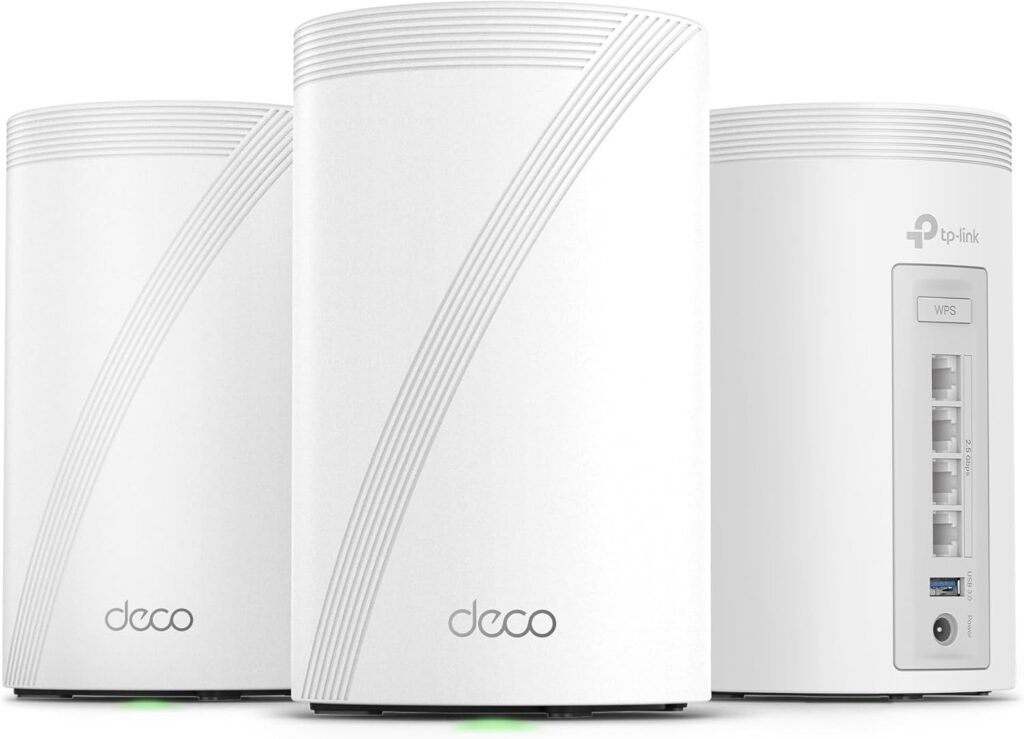
TP-Link Deco BE63: Specs, Features, Pros & Cons
This review measures the TP-Link Deco BE63 against the full 21-spec sheet we track for Mesh Wi-Fi Systems, comparing it like for like with the 4 other models in our database. It earns a VS Score of 46 out of 100 — the weighted result of every verified specification measured against the class average.
On the spec sheet it is strongest in ports & backhaul and weakest in wireless. Its clearest single advantage over the class average: a higher ethernet ports per unit — 4 vs 3.4 (avg). None of our retail partners currently lists the TP-Link Deco BE63, so availability may be limited; a missing price never affects the VS Score.
Category strengths
Where the TP-Link Deco BE63 beats the average
- A higher ethernet ports per unit ?4 vs 3.4 (avg)
- Has Quality of Service (QoS) ?
- Has built-in security suite ?
- Has USB port ?
- A slightly higher units included ?3 vs 2.8 (avg)
Where the TP-Link Deco BE63 trails the average
- A lower max wireless speed ?10,086 Mbps vs 17,905.2 Mbps (avg)
- No dedicated wireless backhaul ?
- A slightly lower coverage area ?7,600 sq ft vs 7,840 sq ft (avg)
- No smart home hub ?
- Fewer max connected devices ?200 vs 212.5 (avg)
Editor’s note
The Deco BE63 is the value pick of TP-Link's Wi-Fi 7 mesh line, and its best feature is one you can miss entirely while shopping: every unit has four 2.5 Gbps Ethernet ports. Most mesh nodes at this price give you two ports and call it a day. Four multi-gig ports per cylinder means wired backhaul, a desk, a TV and a console can all plug straight in — no switch shopping, no port anxiety.
The wireless side is proper Wi-Fi 7 rather than the badge-only kind: tri-band with a real 6 GHz radio, MLO, and a 10,086 Mbps combined rating. TP-Link quotes 5,800 sq ft for the two-pack and 7,600 for the three-pack, with capacity for 200 devices. For a typical family home on a gigabit-or-so plan, that's more system than you'll saturate.
What you give up against the dearer Deco BE67 is a 10 Gbps port (there isn't one anywhere) and some 6 GHz speed. What you give up against premium mesh systems generally is a dedicated backhaul band — the BE63's units relay traffic over the same radios your devices use, which is exactly why those four Ethernet ports matter: wire the nodes if you can. There's also no smart-home radio, so no Zigbee or Thread hub duty, and TP-Link's HomeShield security follows the familiar pattern of free basics plus a paid tier for the real protection.
For me this is the sensible default in TP-Link's Wi-Fi 7 mesh range: at its frequent sub-$400 three-pack pricing, it undercuts rivals that offer less wired flexibility. Skip it only if you have a multi-gig plan begging for a 10G port — that's the BE67's job — or if you want your mesh to double as a smart-home hub, where Amazon's eero line is the more natural fit.
Specifications
Quality bars are generated automatically against 4 other mesh wi-fi systems.
Wireless
The Wi-Fi generation supported; later is faster and handles more devices.
The combined theoretical throughput across all bands.
The total home size the included units are rated to cover.
How many mesh units come in the pack.
A third radio band keeps speeds up when units relay traffic wirelessly.
A band reserved for unit-to-unit traffic so client speeds don't halve.
A 6 GHz radio offers uncongested airspace for Wi-Fi 6E/7 devices.
How many devices the system is rated to handle at once.
Ports & backhaul
Wired ports on each mesh unit for TVs, consoles or desktops.
An internet port faster than 1 Gbps futureproofs fast plans.
Units can link over Ethernet for the fastest, most reliable mesh.
A USB port for shared drives or printers.
Features & security
The latest Wi-Fi security standard.
Set up and manage the whole mesh from a phone app.
Filter content and set time limits per device.
Network-level threat protection included or subscription-based.
Prioritises gaming or video traffic over background downloads.
A separate network keeps visitors off your main devices.
Built-in Zigbee/Thread/Matter radio to control smart home devices.
Design
A lighter unit is easier to place around the home.
The height of each mesh unit.
How the VS Score works — and what it can’t tell you
Every measurable spec is scored against the average of all the Mesh Wi-Fi Systems we track: matching the class average scores 50, clearly beating it climbs towards 100, and each spec counts according to an editorial weight that reflects real-world impact — a battery-capacity gap moves the score far more than a colour-options list. The quality bars on the spec cards above show where this model sits inside the full range for its class, and the overall VS Score rolls every weighted result into one number.
Unknown values are never estimated. A spec this product doesn’t report simply drops out of its scoring — it isn’t penalised with a guess — but a thinner spec sheet does mean a score built on fewer data points, which is why completeness is disclosed under About this data.
Most importantly: a spec-sheet lead is not the same as a better product. Megapixels, gigahertz and benchmark points describe capacity, not experience — image processing, software optimisation, thermals, haptics and ergonomics decide how a device actually feels, and no table captures reliability or long-term support quality. Treat the VS Score as a structured summary of what can be measured, not a substitute for your own priorities.
About this data
- Specifications are compiled from each manufacturer’s official spec sheet, cross-checked against trusted specification databases, and normalised into one schema so identical things are compared identically.
- Specifications last verified August 20, 2026.
- Data completeness: 20 of the 21 specs in this category are verified (95%). Anything we could not verify is shown as Unknown — never estimated — and is excluded from the score.
- Prices and availability come from live retailer feeds via our shopping partners and refresh throughout the day; a missing price means no partner currently lists the product, not that it is discontinued.
- Want the full picture? Our editorial guidelines explain how we research products, weight the scores and stay independent.
- Spotted an error in a spec? Tell us and we will correct the sheet.
Mesh Wi-Fi Systems with similar specs to the TP-Link Deco BE63
Ratings & reviews
No reviews yet. Be the first to share your experience.
The bottom line
The TP-Link Deco BE63 earns a VS Score of 46, a solid mid-pack result among the 5 mesh wi-fi systems we compare here.
- Who it’s for
- Family homes on gigabit-to-2.5G plans that want genuine Wi-Fi 7 mesh — real 6 GHz, MLO — with unusually flexible wiring: four 2.5G ports on every unit means wired backhaul plus a TV, console and desk without buying a switch.
- Who should look elsewhere
- Multi-gig households wanting a 10G port (there isn't one anywhere in the system), buyers who need a smart-home hub built into their mesh, and anyone expecting the full security suite without a subscription.
- The trade-off that matters
- Price versus backhaul: there's no dedicated band for node-to-node traffic, so its excellent value assumes you'll wire at least the far node — do that and it punches well above its cost; leave it wireless in a sprawling house and pricier systems pull ahead.
- The main alternative
- TP-Link Deco BE67 — the same family with a 10G port per unit and a faster 6 GHz radio, worth the difference only when a multi-gig plan or NAS will actually use it.
The VS Score is generated automatically from the weighted specifications above, measured against all other mesh wi-fi systems in our database. Treat it as a shortlisting guide — not a substitute for your own priorities.