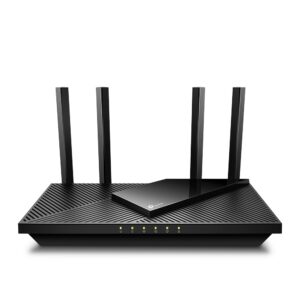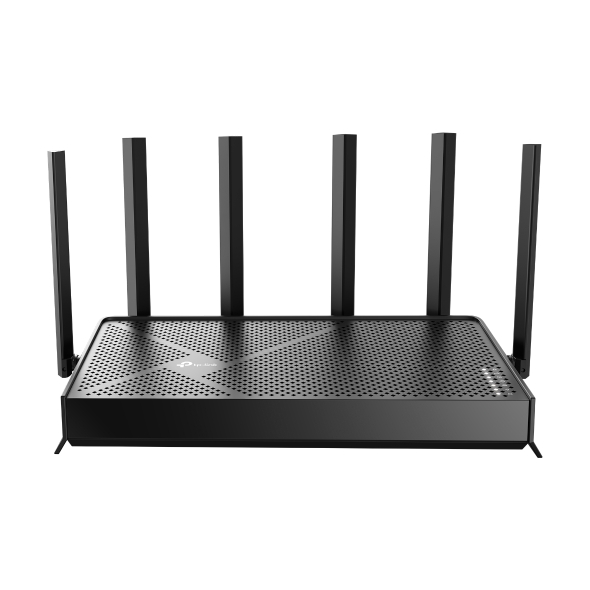
TP-Link Archer BE400: Specs, Price, Pros & Cons
TP-Link sells the Archer BE400 as a BE6500 router, and both radios behind that number work on the older bands: 5,764 Mbps on 5 GHz and 688 Mbps on 2.4 GHz. There is no 6 GHz radio. That band carries Wi-Fi 7's 320 MHz channels. From the new standard, the BE400 gets Multi-Link Operation, which lets a Wi-Fi 7 phone or laptop use both bands at once. It also gets 4K-QAM, which packs more data into each transmission.
Its closest relative is TP-Link's Archer BE230. The two have the same ports and the same USB 3.0 socket. The BE400 doubles the 5 GHz rating and adds two external antennas, for six in all. By our arithmetic, the BE400's 5 GHz figure is four Wi-Fi 7 streams at 160 MHz, and the BE230's 2,882 Mbps is two. The extra antennas fit that count.
On a multi-gig plan, the wired side does more than either radio. The WAN port and one LAN port run at 2.5 Gbps, with three gigabit ports beside them. A single desktop or a wired mesh node can take the full line rate. On a plan of a gigabit or less, the multi-gig pair is spare capacity, and the three gigabit ports carry everything else.
EasyMesh lets you add nodes later, OpenVPN and WireGuard work as both server and client, and the Tether app handles setup. Guest networks run on both bands, and a separate IoT network keeps smart plugs and cameras on their own Wi-Fi name. The USB port shares a drive over Samba, FTP or a media server, which is enough for backups and a family photo folder.
Category strengths
Where the TP-Link Archer BE400 trails the median
- No security suite, no subscription ?
How this VS Score was computed
Score 47: each known spec is measured against the median of all wi-fi routers (28 products), then weighted. 50% of the scoreable weight could be used. See how we score
| Specification | This product | Cohort median | Score weight | Points moved |
|---|---|---|---|---|
| 6 GHz band | No | 48% of the class have it | 1 | −48.0 |
| Multi-gig LAN | Yes | 64% of the class have it | 0.8 | +40.0 |
| Security suite, no subscription | No | 50% of the class have it | 0.5 | −24.0 |
| Wi-Fi standard | Wi-Fi 7 | Wi-Fi 7 | 2 | +0.0 |
| Max wireless speed | 6,452 | 6,452 | 2 | +0.0 |
| Frequency bands | 2 | 2 | 1 | +0.0 |
| WAN port speed | 2.5 | 2.5 | 1.5 | +0.0 |
| LAN ports | 4 | 4 | 1 | +0.0 |
| USB ports | 1 | 1 | 0.3 | +0.0 |
Not scored: Coverage area (unknown: not scored); MU-MIMO (standard for the class (100% have it)); OFDMA (standard for the class (100% have it)); Beamforming (standard for the class (100% have it)); Max connected devices (unknown: not scored); Link aggregation (unknown: not scored); Processor cores (unknown: not scored); Processor speed (unknown: not scored); RAM (unknown: not scored); WPA3 (standard for the class (100% have it)); Mesh support (standard for the class (95% have it)); Guest network (standard for the class (100% have it)); Parental controls (standard for the class (100% have it)); Quality of Service (QoS) (standard for the class (100% have it)); VPN server (standard for the class (100% have it)); App control (standard for the class (100% have it)); Weight (unknown: not scored); Wall-mountable (unknown: not scored).
Editor’s note
A phone or laptop with two Wi-Fi 7 streams links at the same top rate on both routers. Each stream carries 1,441 Mbps on either one, and two of them make up the smaller router's whole rating on that band. The other two streams pay off when several devices talk to the router at once through MU-MIMO, or with a client that has four streams of its own. I'd pay the difference for a busy household with several Wi-Fi 7 devices streaming in the evening, and not for one Wi-Fi 7 laptop.
Wi-Fi 6 gear gains nothing from MLO or the denser signaling. TP-Link's footnote says those features need clients that support them. A home of Wi-Fi 6 laptops and phones would find the two routers hard to tell apart.
Only one LAN port is multi-gig, so a NAS and a desktop that both want more than a gigabit have to take turns on it. A small multi-gig switch on that port is the cheap fix.
TP-Link gives both routers the same "3 Bedroom Houses" range claim. The two extra antennas carry the extra streams, and TP-Link promises no more reach for them. Buy the BE400 for capacity and expect the same coverage.
TP-Link's tri-band Archer BE550 rates its 5 GHz radio at 2,880 Mbps, half the BE400's. A house whose Wi-Fi 7 devices never touch 6 GHz gets less on the band it uses by stepping up to it.
Specifications
Wireless
Ports & wired
Hardware
Features & security
Design
Networking assessment
Connection requirements
The WAN (internet) port is rated at 2.5 Gbps. An internet plan faster than that is capped at the router, and nothing on the network can download faster than this port regardless of the wireless figures.
There are 4 LAN ports, at least one of them multi-gig, so one wired device can run above Gigabit speed.
Throughput expectations
The Wi-Fi 7 headline of 6,452 Mbps adds together the theoretical peak of every band. A single device connects to one band at a time, so no client ever sees the total, and real-world speeds run well below the link rate even in the same room.
There is no 6 GHz band, so the least congested spectrum available to new phones and laptops is not on offer here.
OFDMA and MU-MIMO help most when many devices are active at once; they do not make a single download faster.
Firmware and subscriptions
The US download page lists hardware version V1.6. Its newest firmware is 1.4.3 (Build 20260721), published September 11, 2026 as a stability release, and the 1.4.2 build before it carries TP-Link's warning that the upgrade cannot be reversed. Several files on the page are shared with the Archer BE6100 and BE6500. Updates install from the web interface or the Tether app, with an optional automatic schedule.
Set-up and management run through the manufacturer’s app; check whether a local web interface is offered as well.
Parental controls are listed; on several brands the scheduling and filtering tiers sit behind the same subscription as the security suite.
VPN support is built in, which avoids a subscription to a third-party VPN router service for remote access.
Security support
WPA3 is supported, the current Wi-Fi encryption standard; devices that only speak WPA2 still connect in mixed mode.
A guest network is available for visitors and smart-home devices, keeping them off the network your computers use.
Security-update cadence is not something manufacturers publish as a specification; see Support and updates below.
Real-world household suitability
Mesh support means coverage can be extended later with a compatible satellite instead of replacing the router.
Known limitations
Not offered, according to the spec sheet: 6 GHz band, security suite, no subscription.
8 specifications are not published by the manufacturer and are shown as Unknown rather than guessed.
Support and updates
TP-Link publishes a V1.6 datasheet, a quick installation guide and one product and installation guide covering the Archer BE400, BE6500, BE6100, BE270 and BE370, plus its generic web user guide for Wi-Fi routers. HomeShield's free plan covers scans and device identification, and IoT protection, web protection, intrusion prevention and parental time limits are sold as paid plans.
Sources and verification
Where the specifications come from
- Official product pagetp-link.com
Verification
- First published
- Specifications last checked
- Sheet completeness
- 20 of 28 specifications verified; the rest show as Unknown and are never estimated or scored
- Page type
- Product specification page — Compiled from the manufacturer’s published specifications and the cited sources; this is not a hands-on test.
- Basis
- Research-based: specifications and editorial text were compiled from the documents listed here and the manufacturer’s published data. We have not tested this unit ourselves; where independent measurements are mentioned they belong to the linked publication.
Where to buy
Prices and availability may change. Check the retailer before buying. We may earn a commission on purchases.
Price history
Wi-Fi Routers with similar specs to the TP-Link Archer BE400
Ratings & reviews
No reviews yet. Write the first one
The bottom line
The TP-Link Archer BE400 earns a VS Score of 47, below the median of the 28 wi-fi routers it is measured against (a score of 50 is level with that median).
- Who it’s for
- A household with several Wi-Fi 7 phones and laptops busy at once, on a multi-gig plan, with no 6 GHz devices yet.
- Who should look elsewhere
- Homes whose devices are Wi-Fi 6 or older, which get the same ports and nearly the same Wi-Fi from the Archer BE230, and anyone set on a 6 GHz band.
- The trade-off that matters
- Its extra hardware goes into more streams on the band most devices already use, so the gain only shows when several Wi-Fi 7 devices are busy at once.
- The main alternative
- TP-Link Archer BE550: adds the 6 GHz band and multi-gig speed on every Ethernet port, for a home that already owns 6 GHz devices.
This page was created with the help of AI. How we work