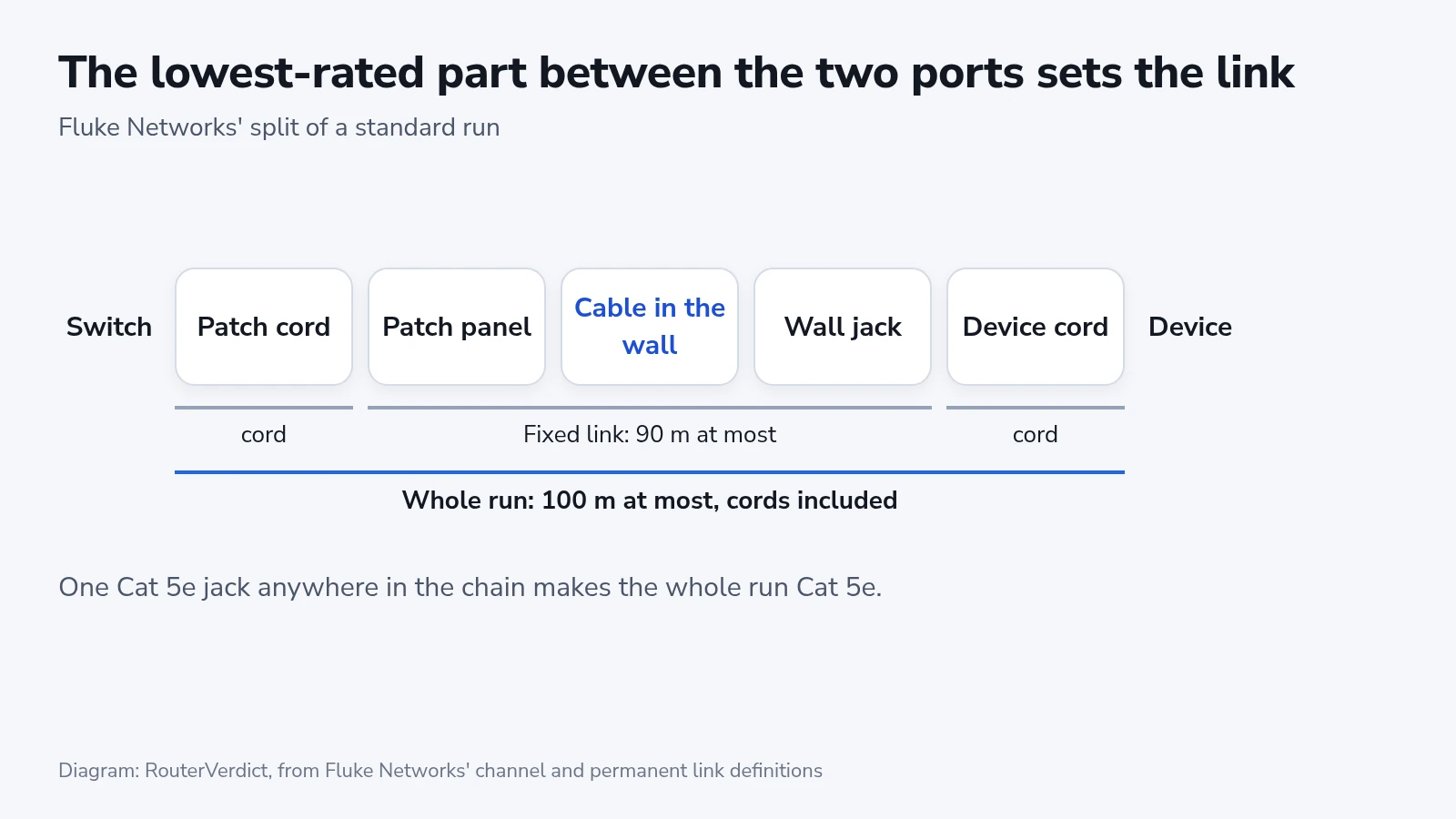
Pick the Ethernet cable category from two facts about a run: the fastest speed both ports share and the length of the route. The categories sold today run from Cat 5e to Cat 8.2, and the ports on current routers, switches and access points run at gigabit, 2.5G, 5G or 10G. Older walls can still hold Cat 3, Cat 4 or Cat 5. Have the spec sheets of both devices and a tape measure at hand, and allow about ten minutes per run. You will end with a category for each run and a way to confirm the link came up at full speed. The lowest-rated part sets the whole run, so a Cat 6a cable through a Cat 5e wall jack makes a Cat 5e link.
Before you start
- The speed of the ports at both ends of the run, from the spec sheet or the label beside the port: 1G, 2.5G, 5G or 10G.
- The length of the route the cable will follow, up and down walls and across ceilings, plus the cords at both ends.
- For cable going inside walls, whether the route passes between floors or through a space above a ceiling that carries air for the heating and cooling system.
- A way to read the link speed afterward: speed LEDs on the switch, the router's app, or the network status on the computer.
What each category is rated to carry
| Category | Tested to | Fastest Ethernet and distance | Plug |
|---|---|---|---|
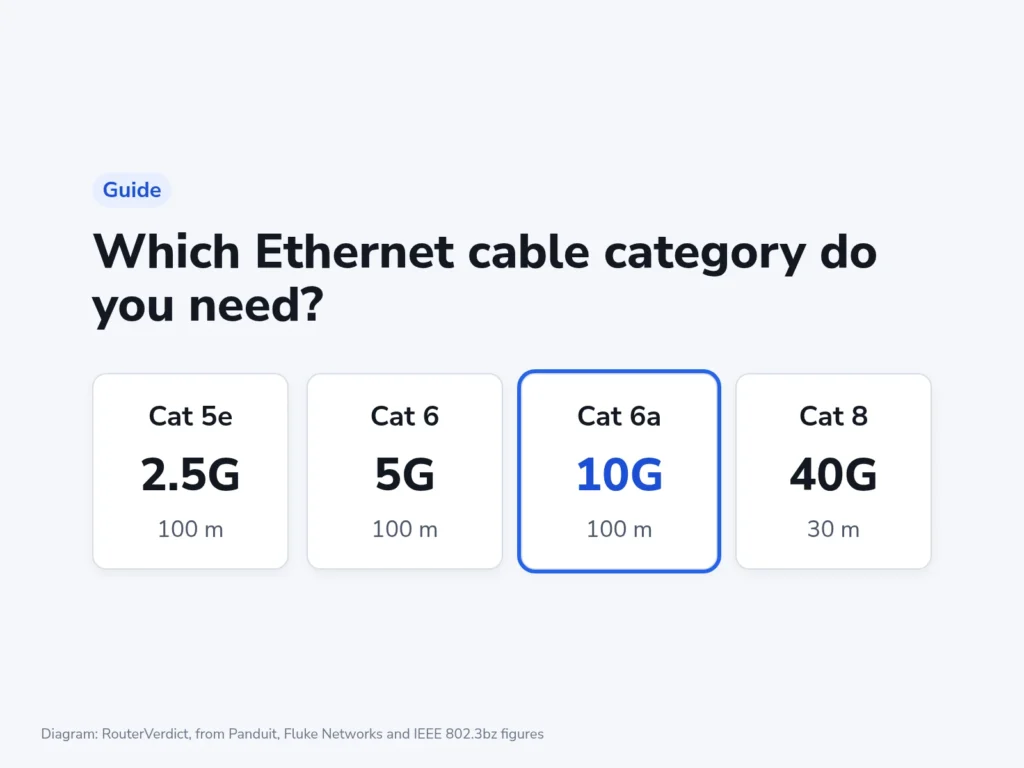
| Cat 5e | 100 MHz | 2.5G over 100 m | RJ45 |
| Cat 6 | 250 MHz | 5G over 100 m, 10G over 37 to 55 m | RJ45 |
| Cat 6a | 500 MHz | 10G over 100 m | RJ45 |
| Cat 7 | 600 MHz | 10G over 100 m | Not RJ45 in its standard |
| Cat 7a | 1,000 MHz | 10G over 100 m | Not RJ45 in its standard |
| Cat 8 (8.1) | 2,000 MHz | 25G and 40G over 30 m | RJ45 |
| Cat 8.2 | 2,000 MHz | 25G and 40G over 30 m | TERA or another non-RJ45 plug |
Each category also carries every slower speed, and each distance is the whole run from port to port. Fluke Networks, a maker of cable certification testers, caps the fixed part (patch panel to wall jack) at 90 m (295 ft). That leaves 10 m for the cords in a 100 m (328 ft) run. Panduit splits the Cat 8 distance the same way, into 24 m of fixed cable and 6 m of cords.
Cat 6 has two 10G distances because what limits it is crosstalk from other cables bundled alongside, and that changes from one building to the next. The TIA bulletin for 10G on existing Cat 6, TSB-155, says 10GBASE-T should work up to 37 m (121 ft) and may work up to 55 m (180 ft) depending on that crosstalk. Fluke has measured 60 m links that pass and 30 m links that fail, so beyond the shorter figure only a test of the actual run settles it.
The 2.5G and 5G figures come from IEEE 802.3bz, which also allows 5G over Cat 5e in defined cases. NETGEAR's general cable article says good Cat 5e can typically carry 5G over a full-length run. Only Cat 6 is rated for it, so plan 5G runs on Cat 6.
Choosing the category for one run
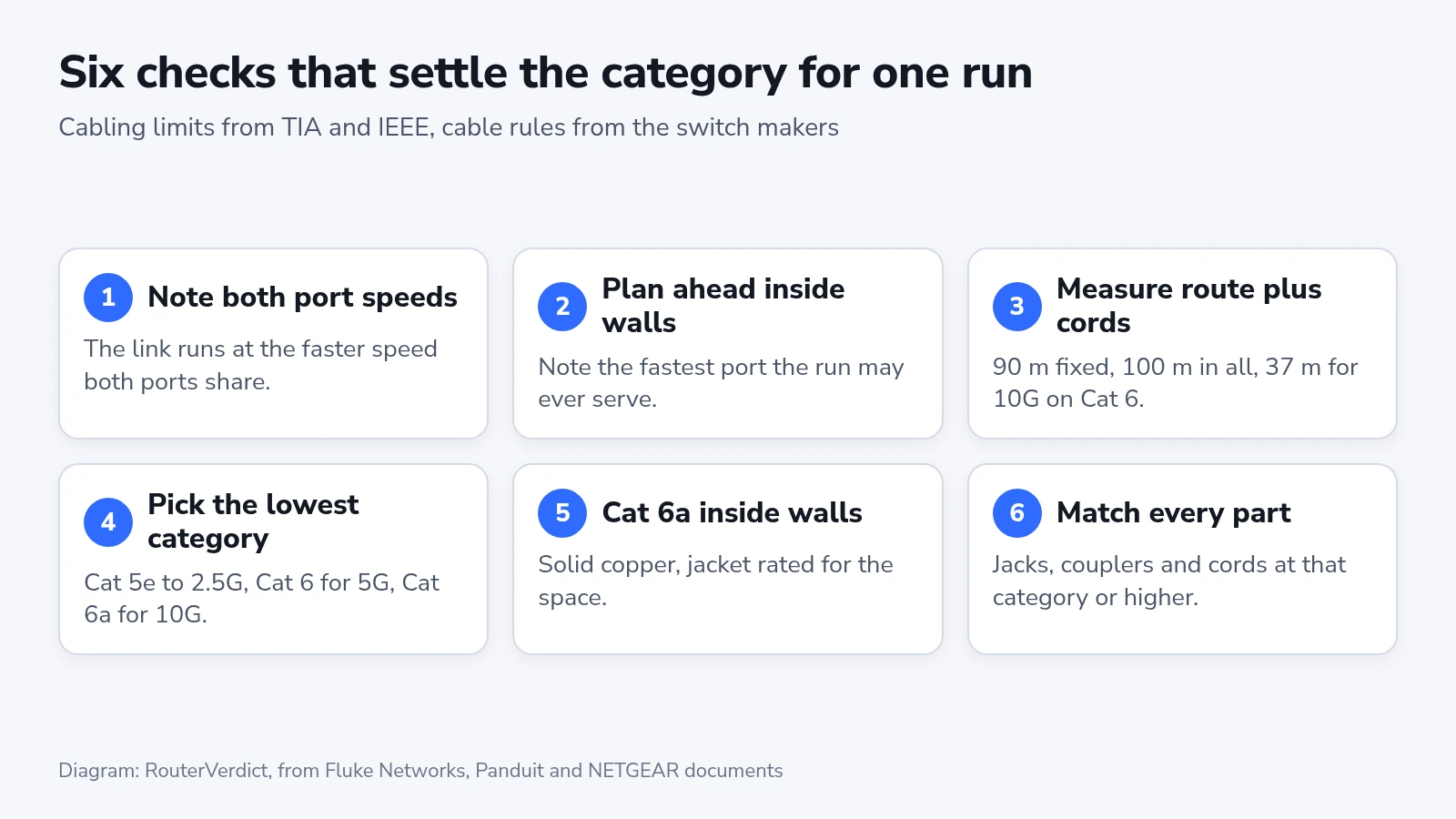
- Note the speed of the ports at both ends. The link runs at the fastest speed both share, so a 10G switch port wired to a 2.5G access point makes a 2.5G link.
- For cable going inside a wall or ceiling, also note the fastest port it might serve later, because replacing it means opening the wall again.
- Measure the route the cable will follow and add the cords at both ends. Keep the fixed cable within 90 m and the whole run within 100 m, or within 37 m for 10G over Cat 6.
- Pick the lowest category in the table that carries that speed over that length: Cat 5e for gigabit and 2.5G, Cat 6 for 5G, Cat 6a for 10G.
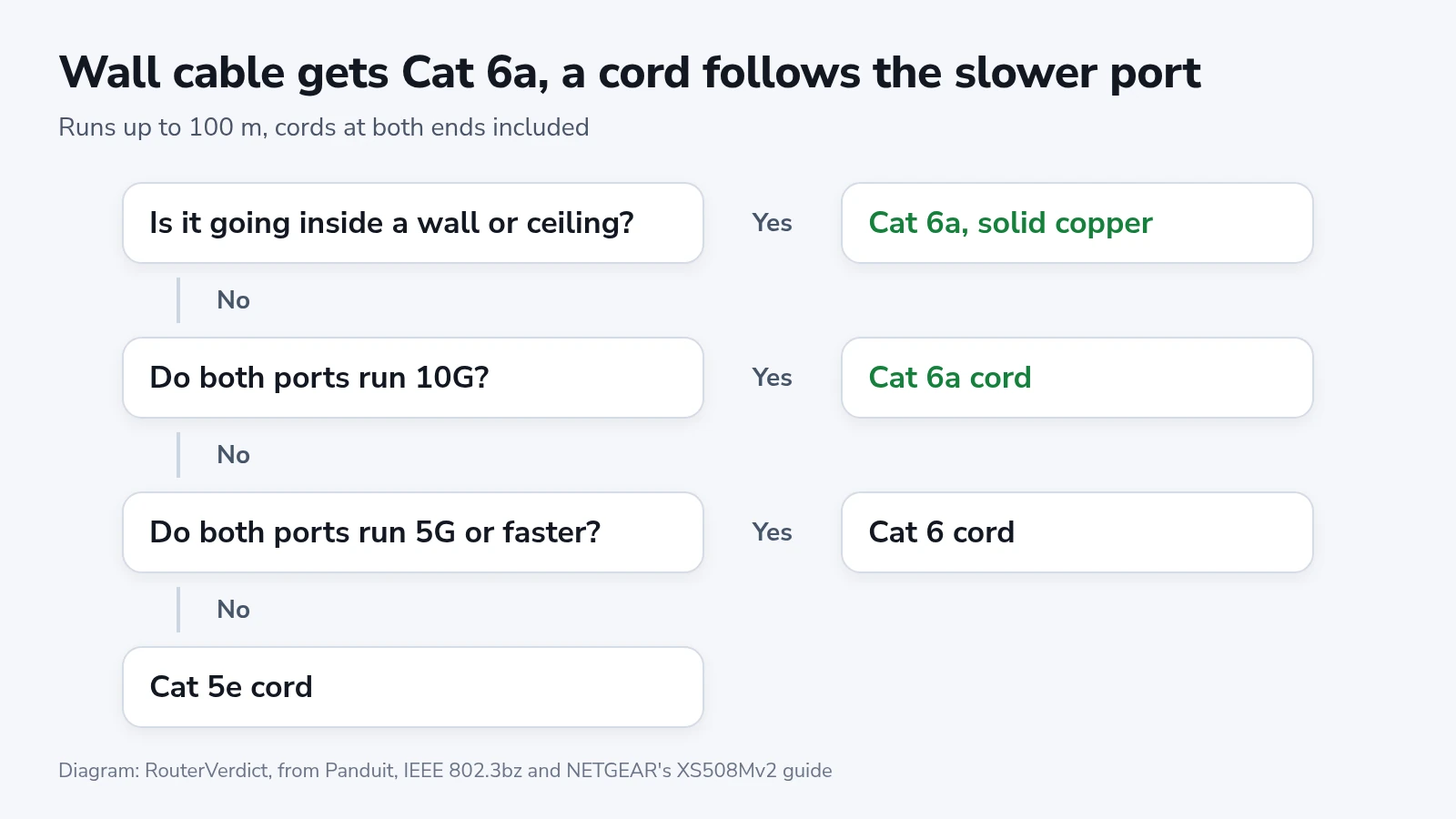
- Inside walls, use Cat 6a whatever the ports are today, with solid copper conductors and the jacket rating your building needs.
- Buy every jack, coupler, patch panel port and cord in the run at that category or higher.
Cat 6a is the lowest category that carries 10G over a full-length run. Panduit's comparison of the categories rates it "Optimal" for Power over Ethernet where Cat 6 gets a plain "Yes", and lists 23 AWG conductors for it. Panduit recommends Cat 6a for new cabling, in a shielded version if you want a shield. A run inside a wall has to serve whatever replaces today's router, which is why step 5 puts Cat 6a there.
A cord behind a desk is easy to swap, so match it to the slower port. A PS5 Pro, for example, has a gigabit port (1000BASE-T in Sony's spec list), and any Cat 5e cord carries everything that port can do.
Cat 7, Cat 8 and the RJ45 plug
Cat 7 and Cat 7a come from the international ISO/IEC 11801 standard, and TIA, which writes the US cabling standards, recognizes neither. Their standard calls for connectors that do not fit an RJ45 port (IEC 61076-3-104 or 61076-3-110). Panduit's tech brief on Cat 7 says a hybrid cord to an RJ45 port pulls the link back to the level of the RJ45 plug, likely Cat 6 or Cat 6a. It also shows Cat 7 and 7a carrying the same gigabit, multi-gig, 10G and Power over Ethernet as Cat 6a. So a cord sold as "Cat 7" with RJ45 plugs at both ends is at best a Cat 6a cord.
IEEE approved 25GBASE-T and 40GBASE-T, the speeds Cat 8 was written for, on June 30, 2016, for links between switches and servers in data centers. Both need shielded cable and stop at 30 m. In its 2023 brief, Panduit said it knew of no equipment, or plans for any, running at either speed. Cat 8.1 keeps the RJ45, and CommScope's white paper says Category 8 includes every Cat 6a parameter, so it carries 10G and slower as far as Cat 6a does. Cat 8.2 uses other connectors, such as Siemon's TERA, with adapter cords for RJ45 equipment. On ports that top out at 10G, Cat 8 does the work of Cat 6a in a cable that has to be shielded.
Every part between the ports counts
A run can pass through four connections: the switch cord into a patch panel, the panel into the cable in the wall, that cable into a wall jack, and the jack into the device cord. Each of them has to carry the category the ports need. Panduit puts it in Cat 7 terms: Cat 7 cable fitted with shielded Cat 6a connectors adds up to a shielded Cat 6a system. Fluke calls patch cords the weakest link, since they are handled, moved and often bought from a different vendor than the cable.
Fluke's advice about Cat 6 sold online for about half the brand-name price is to make sure it is not copper-clad aluminum (CCA), even when the jacket claims TIA compliance and carries a UL mark. CCA cable does not meet the standard and often has no valid UL safety listing. Aluminum has about 55% more resistance than copper of the same diameter, so a CCA run carrying Power over Ethernet heats up more and leaves less voltage for the camera or access point at the far end.
Read the jacket before a box of cable goes into a wall. The print should name the category, and Lorex's cable help page notes that its UL-listed cables carry the UL mark and a UL file number on the cable. Check the fire rating on the jacket or the box. Lorex describes CM as general-purpose cable for walls in a house or a single-story commercial building, CMR (riser) for runs between floors, and CMP (plenum) for spaces that move air for heating and cooling. Your local building authority decides which one a run needs.
Cable rules from NETGEAR, TP-Link and Ubiquiti
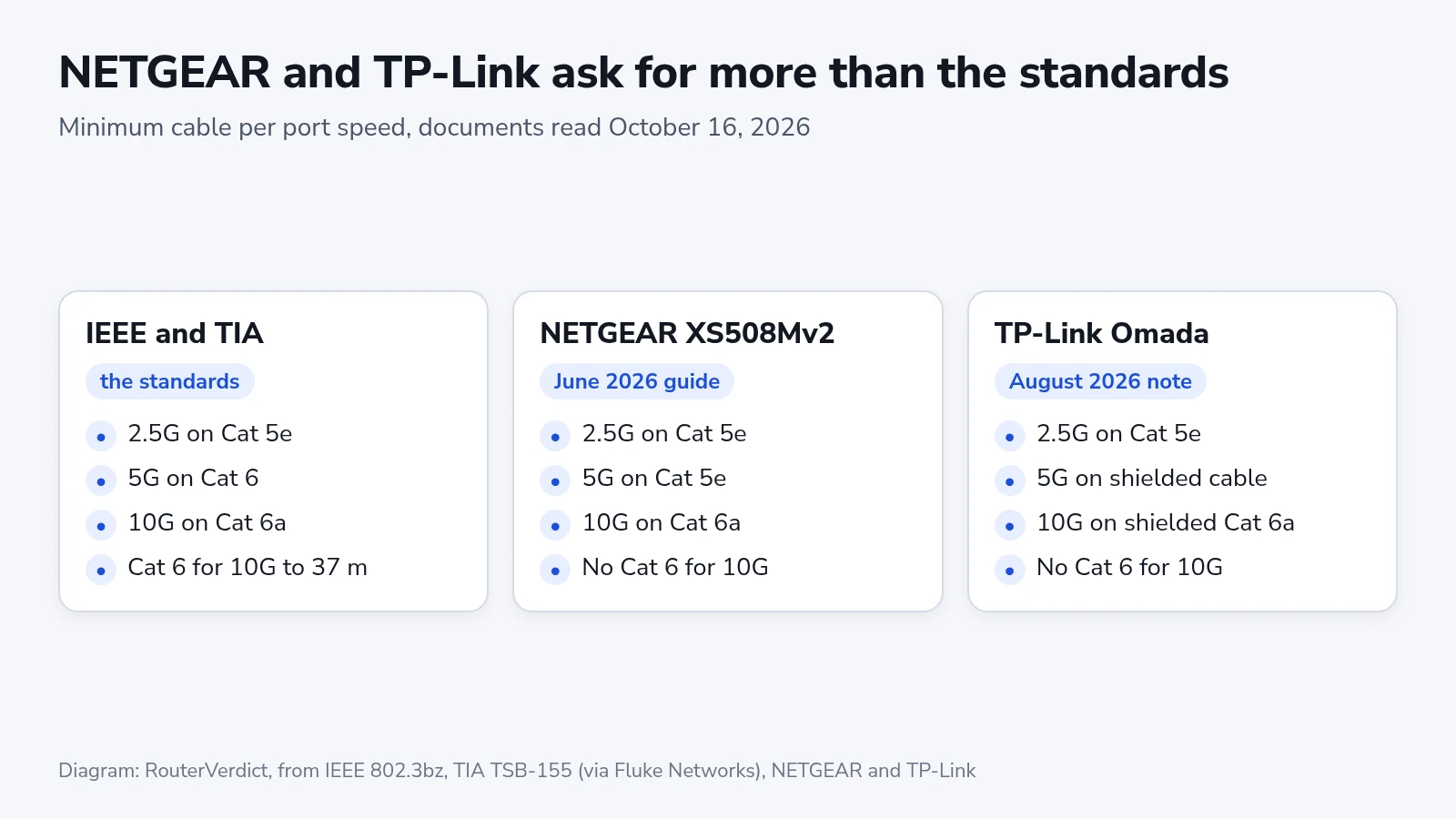
NETGEAR's June 2026 installation guide for the XS508Mv2 accepts Cat 5e for 1G, 2.5G and 5G links and asks for Cat 6a or higher on every 10G link, with no exception for short runs. It also recommends Cat 6a U/FTP, a cable with foil around each pair, for 5G and 10G. A 20 m Cat 6 run that the TIA bulletin expects to carry 10G still falls short of what NETGEAR asks for on this switch.
TP-Link's Omada support note on cables, dated August 24, 2026, is stricter about shielding: Cat 5e for 2.5G and slower, shielded Cat 5e or Cat 6 for 5G, and shielded Cat 6a with 23 AWG conductors for 10G. It names link flapping (the port dropping and reconnecting), packet loss and Power over Ethernet devices that lose power as the signs of a cable below that grade.
Shielded cable needs shielded jacks, with the foil bonded to each jack the way Leviton's termination notes for its shielded jacks show. Ortronics describes those jacks grounding through the patch panel, and the panel through a wire to the cabling system's ground bus.
NETGEAR's general knowledge base article on cables, last updated July 7, 2025, asks for Cat 6 or better on any multi-gig link, 2.5G included. Ubiquiti's help page on wired speeds recommends CAT6 for RJ45 connections. Where a device's own guide and a general article disagree, follow the guide for that device. On a USW Pro XG 8 PoE, where all eight RJ45 ports run 10G and supply PoE++, any run longer than 37 m needs Cat 6a. On a router such as the Archer BE550, whose WAN port and four LAN ports top out at 2.5G, Cat 5e covers a full-length run.
Cable already in the walls
Older houses and offices can have Cat 3, Cat 4 or Cat 5 behind the wall plates, and the jacket print says which. The cable maker Windy City Wire describes Cat 3 as rated to 16 MHz for telephone lines and 10 Mbps Ethernet, and Cat 4 as rated to 20 MHz for 16 Mbps Token Ring networks. TP-Link's Omada table lists Cat 5 at 100 MHz and 100 Mbps. Leave Cat 3 and Cat 4 to telephone wiring and pull new cable for data. A Cat 5 run that links at gigabit and holds the link can stay, and anything faster needs new cable.
Reading the link speed after you plug in
- Plug in both ends and wait for the port light to come on.
- Find where the link speed shows: the port LEDs on an unmanaged switch, the port list in the router's app or the UniFi Network application, or the network adapter's status on the computer.
- On an XS508Mv2, match the port's two LEDs to the legend printed beside the ports: two green LEDs mean 10G, two yellow 1G, and a single yellow LED 100 Mbps.
- Compare the speed with the slower of the two ports. If they match, the run is done.
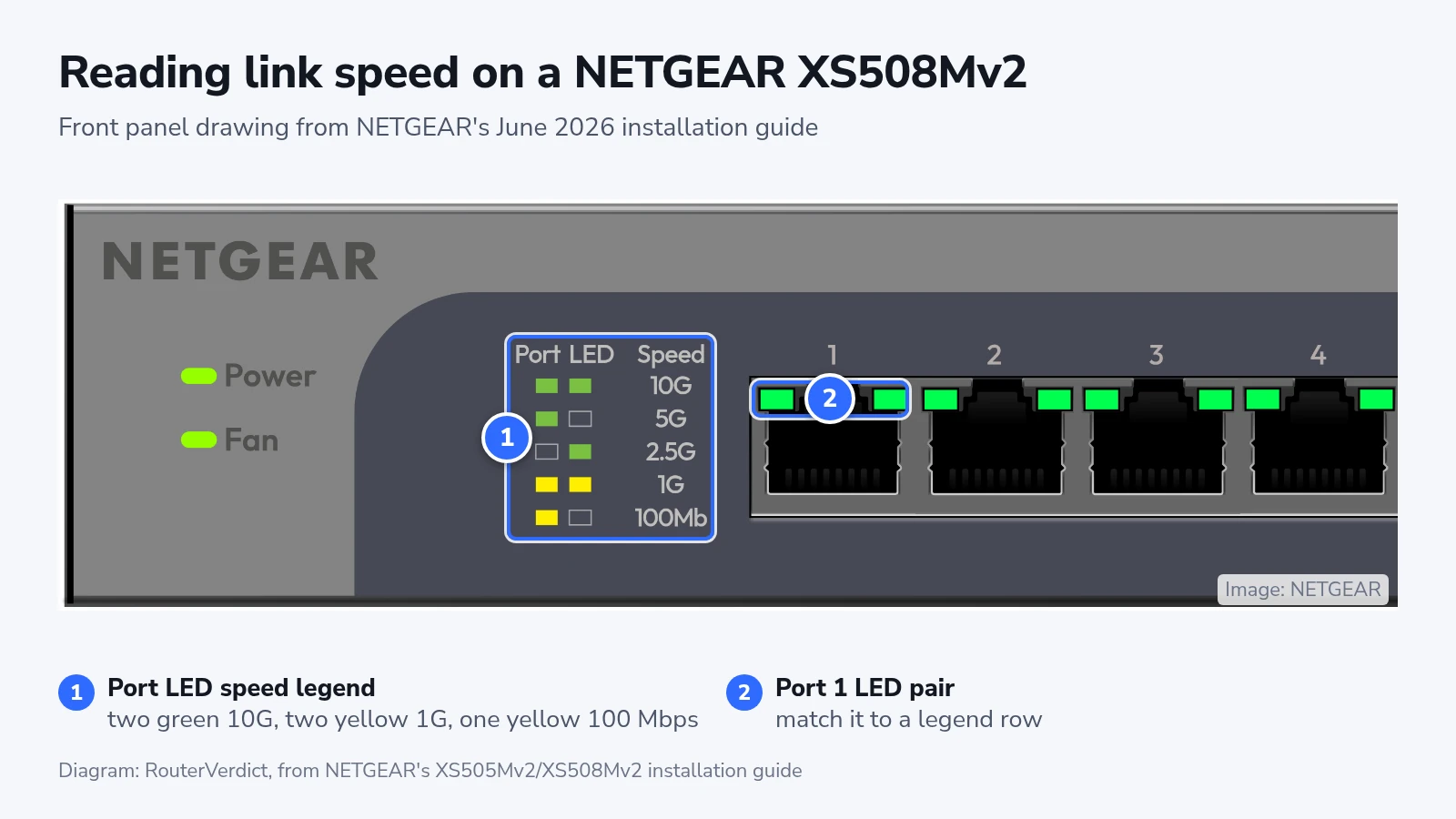
A single green LED means 5G or 2.5G, and NETGEAR's guide contradicts its own drawing on which is which. Its text gives 5G as the left LED off and the right one green. The legend in its drawing shows 5G as left on and right off, with 2.5G the mirror image. Go by the legend printed on your switch. The same legend separates 1G from 100 Mbps, which the guide's text lumps together as yellow.
If the link comes up slower
Stuck at 100 Mbps
NETGEAR's GS508T manual explains that 10BASE-T and 100BASE-TX use two of the four pairs and 1000BASE-T uses all four. A gigabit-or-faster port that settles at 100 Mbps points to a pair that is broken or wired to the wrong pin. Ubiquiti's first steps are to unplug and replug the cable, then swap it for another. If the fault is in a jack or plug you terminated, redo it with no more than 10 mm (3/8 in) of untwisted pair and 32 mm (1 1/4 in) of stripped jacket, the limits in the same manual.
1G, 2.5G or 5G on a 10G port
The run is too long for its category (Cat 6 past 37 m), one part in it is below Cat 6a, or neighboring cables in a bundle add too much crosstalk. Replace the weak part. If you cannot, TP-Link suggests setting the port to a lower speed such as 2.5G or 1G, so the link stays up at that speed instead of dropping in and out.
Drops in and out, or PoE devices restart
TP-Link lists both as signs of a cable below grade for the speed. Check the run for a part below the category the port needs, then check the cable for CCA. Fluke's test is to scrape a conductor at a cut end, where aluminum shows silver under the copper.
When to check again
Read the link speed again whenever you swap a cord, add a coupler or move a faster device onto a run, because a part that carried 2.5G cleanly can still hold a 10G port back. Label both ends of each new run with its category and length. When a 10G device arrives, check two kinds of run first: Cat 6 runs longer than 37 m, and every Cat 5e run, which has no 10G rating at all.