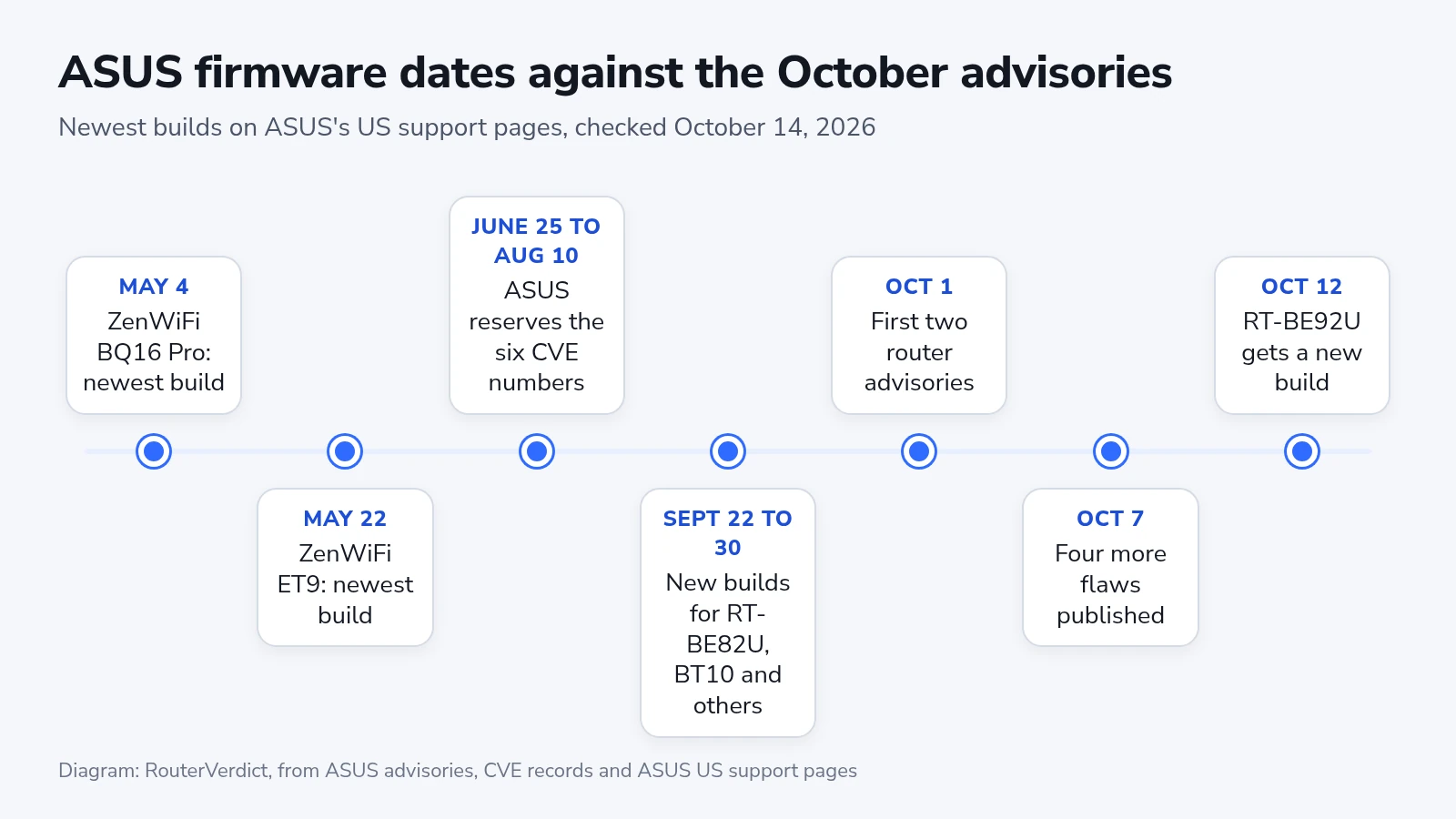
ASUS published six router vulnerabilities in a week, in advisories dated October 1 and October 7, 2026, and none of the three advisories names an affected model or the build that fixes it. Each one asks owners to install the latest ASUS router firmware. On October 14 we went through ASUS’s US support pages for ten current ASUS routers and mesh systems, and eight of them show a build released since late August. The ZenWiFi ET9 and ZenWiFi BQ16 Pro still top out at builds from May, weeks before ASUS reserved the first of these vulnerability numbers.
What each flaw needs from an attacker
The first October 1 flaw, CVE-2026-13313, lets an attacker who is signed in as the administrator send a crafted request that switches on Telnet and runs commands as root. ASUS rates it High at 8.9 on the CVSS 4.0 scale, and its record lists all three firmware branches in use today: 3.0.0.4.386, 3.0.0.4.388 and 3.0.0.6.102. CVE-2026-14157, rated Critical at 9.4, runs commands through a crafted VPN client configuration file uploaded in the web interface, and its record lists only the 102 branch.
On October 7 ASUS published four more. CVE-2026-14911 (Critical, 9.3) is a cross-site scripting flaw, so a crafted link opened by someone already signed in to the router can read the page, change settings or take the router down. CVE-2026-19386 (Critical, 9.3) is a buffer overflow reached by uploading a crafted configuration file from the local network. CVE-2026-16528 (High, 8.4) leaves DDNS credentials in the system log on all three branches. CVE-2026-19396 (High, 7.7) makes the IFTTT pairing token guessable to someone nearby while the owner is pairing, and its record names only the RT-BE57.
Four of the six require administrator access before anything else happens, whatever their scores. The other two need the administrator to act first, by opening a crafted link while signed in or by starting an IFTTT pairing with a stranger on the network.
CISA’s coordinators recorded no known exploitation for any of the six, and none is in CISA’s Known Exploited Vulnerabilities catalog as of October 13.
Newest build for each model
ASUS’s US support pages listed these as the newest firmware on October 14. The release notes describe security fixes without CVE numbers, so a date tells you only whether a build came out before or after a given point.
| Model | Branch | Newest build | Released (2026) |
|---|---|---|---|
| RT-BE92U | 102 | 3.0.0.6.102_40497 | October 12 |
| RT-BE58 Go | 102 | 3.0.0.6.102_39301 | October 7 |
| ROG Strix GS-BE18000 | 102 | 3.0.0.6.102_39447 | October 1 |
| ZenWiFi BT10 | 102 | 3.0.0.6.102_39436 | September 30 |
| RT-AX1800S (V2) | 388 | 3.0.0.4.388_34163 | September 29 |
| RT-BE90U | 102 | 3.0.0.6.102_58500 | September 23 |
| TUF Gaming BE9400 | 102 | 3.0.0.6.102_58500 | September 23 |
| RT-BE82U | 102 | 3.0.0.6.102_39446 | September 22 |
| RT-AX1800S (V1) | 386 | 3.0.0.4.386_69224 | August 24 |
| ZenWiFi ET9 | 388 | 3.0.0.4.388_25306 | May 22 |
| ZenWiFi BQ16 Pro | 102 | 3.0.0.6.102_39256 | May 4 |
Every build above except the last two came out after August 10, the day ASUS reserved the last of the six numbers. That is not proof of a fix, because ASUS has not said which build closes which flaw. The RT-BE92U and RT-BE82U run the same firmware family, and their newest notes, written twenty days apart, open with the same two items: a required change for the Speedtest service and stronger handling of the connected device list in the web interface.
Two mesh systems still on May builds
The ZenWiFi BQ16 Pro’s newest build is dated May 4 and the ZenWiFi ET9’s May 22. ASUS reserved the six CVE numbers between June 25 and August 10, according to the CVE records, so both builds came out before any of them existed. The May notes do list security fixes, an unsafe remote script execution path on the BQ16 Pro and DNS handling on the ET9, but nothing ties them to the October advisories. Neither system is on ASUS’s end-of-life list, and ASUS has not said when either will get a newer build.
The ZenWiFi BQ16 Pro runs the 102 branch, which appears in all six records, although the IFTTT record describes only the RT-BE57. The ET9 runs the 388 branch, listed for two of them: the Telnet flaw and the logged DDNS credentials. Until a newer build appears, the settings below are the only protection owners of either system have.
Settings that cover the gap
Compare the build your router reports with the table. In the web interface, Administration, then Firmware Upgrade, is where updates are installed, and the same page has an Auto Firmware Upgrade switch that installs new builds at a time you choose. After the update, restart the router: ASUS says the restart clears IFTTT pairing tokens issued before it.
To close web access from the internet, go to Administration, then System, then Remote Access Config, and set “Enable Web Access from WAN” to No. Remote access through the ASUS Router app is a separate switch, “Remote Connection” under Settings, then System Settings, so check both.
ASUS asks for an admin password of at least 10 characters with uppercase letters, numbers and symbols. Four of the six flaws start from a signed-in administrator, so a password nobody can guess keeps an outsider from reaching them directly.
Import a VPN client file only from your VPN provider’s own site, and restore configuration backups only from your own router. Type the router’s address yourself. A link to it in an email or a chat is the route the cross-site scripting flaw needs. Keep system logs out of public help threads, since one of the flaws writes DDNS credentials into them, and run IFTTT pairing only when no device you do not trust is connected.
On an ET9 or BQ16 Pro, keep all of this in place and look for a build newer than May on the model’s support page before you turn remote access back on.