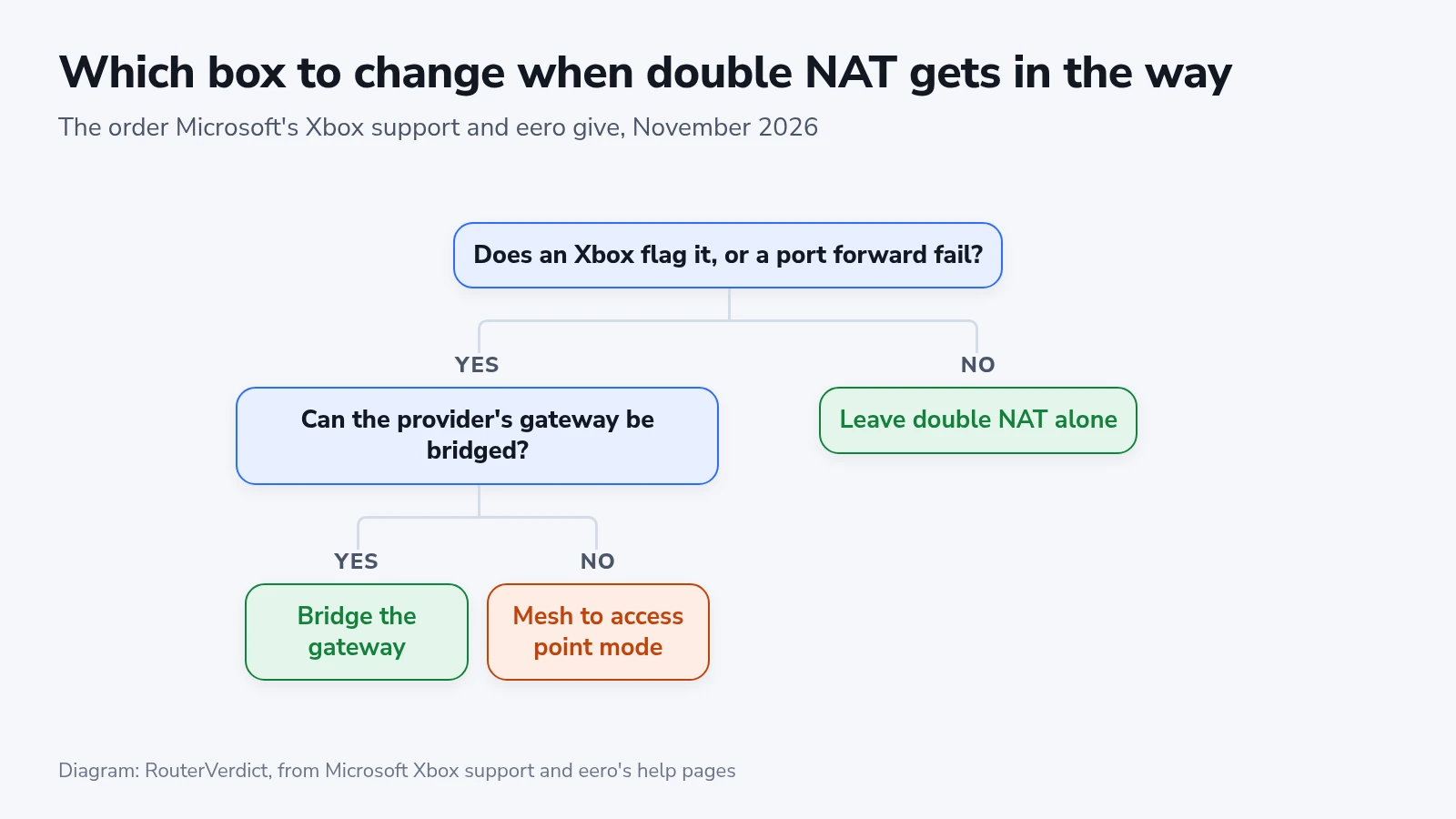
Double NAT means two layers of IPv4 address translation between your devices and the internet. It can happen when your mesh runs as a router behind the gateway your internet provider supplied. Browsing and streaming may work normally. If a console reports double NAT or a port forward fails, check whether the provider supports bridge mode before switching your mesh to access point mode and giving up its routing features.
When double NAT gets in the way
Trouble starts with connections that come in from the internet side, such as hosting a game, joining party chat or reaching something at home through a port forward. A forward set on the mesh alone stops at the gateway in front of it.
A console can flag double NAT when its connection passes through both routers. Port forwarding becomes harder because the mesh is behind another router. A rule on the mesh alone does not open a path through the provider’s gateway.
If nobody in the house plays online or forwards ports, we'd leave double NAT alone.
Bridge the provider's gateway first
eero recommends bridging the provider’s gateway where possible so the eero can retain its routing features. Follow your provider’s instructions for the exact gateway, and check whether bridge mode affects any bundled services. Keep your own router’s firewall enabled. If the gateway cannot be bridged, access point mode on the mesh is the alternative.
On an Xfinity gateway, bridge mode turns off the router and the private Wi-Fi network, and only one device can use its Ethernet ports. You can still manage your account in the Xfinity app, but not your network. Xfinity's CyberSecure service stops working, and the gateway won't switch to bridge mode while Xfinity WiFi Extenders are active. The Home Hotspot, the public Xfinity WiFi signal some gateways broadcast, stays on.
You'll find the switch in the gateway's Admin Tool, under Gateway > At a Glance. The gateway may restart. Then connect your mesh's main unit to one of its Ethernet ports.
AT&T’s instructions describe IP Passthrough or DMZplus for supported Motorola and 2Wire/Pace gateways. These pass the public address to a selected device rather than providing a universal bridge-mode switch. Use the instructions for your model. The selected router must provide the firewall protection that the gateway no longer provides for that connection.
What a mesh loses in bridge mode
eero’s bridge-mode feature list includes the loss of profiles, device blocking, port forwarding, IP reservations, UPnP, custom DNS, Thread and Apple HomeKit Secure Router. It also lists eero Plus features as unavailable except for partner services. Which features matter depends on your model and setup.
If you use an eero Pro 7 for smart-home connections, check the current bridge-mode limitations before changing it. A generic feature list does not establish how every accessory will behave.
TP-Link’s mode-comparison table likewise lists several routing features as unavailable in access point mode, including port forwarding and QoS. Its stated model coverage does not include every newer Deco. For a Deco BE67, check its own current firmware and mode options rather than assuming an older model’s table applies.
Connecting the console to the gateway
Another option is to connect the console to the provider’s gateway directly, over its Ethernet or Wi-Fi, so your mesh router is no longer in that connection’s path. Check the console again before changing other devices.
When you keep double NAT on purpose, give the mesh a different network name and password from the gateway's Wi-Fi. eero warns that two networks with the same name cause problems.
Checking the fix on an Xbox
Restart the affected equipment after the change. On Xbox, open Profile & system > Settings > General > Network settings and run Test NAT type. Removing your second router does not guarantee an Open result: if the warning remains or connections still fail, ask the provider to check the upstream connection.