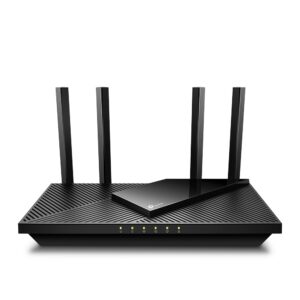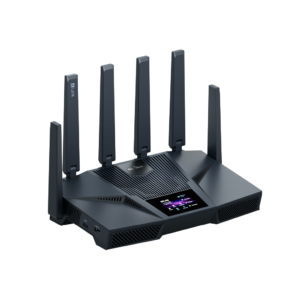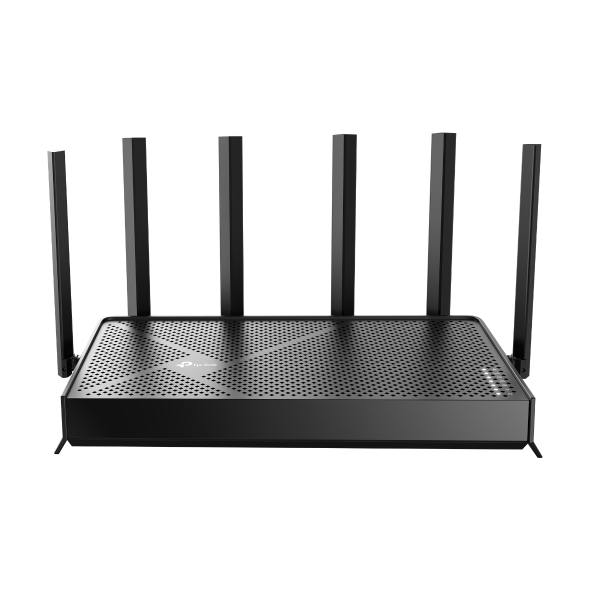
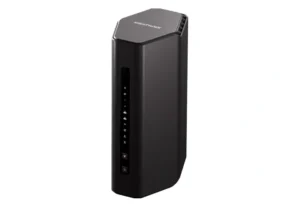
TP-Link Archer BE400: Specs, Features, Pros & Cons
The Archer BE400 sits in the middle of a dual-band ladder that TP-Link does not label very clearly, and the only real difference between its rungs is the 5 GHz radio. This one is quicker than the entry Wi-Fi 7 model in the range and slower than the tri-band units above it, because like the Archer BE230 below it, it has no 6 GHz band at all.
That omission deserves stating rather than burying. The wide 320 MHz channels and the clean spectrum that make the current generation worth upgrading for both live on 6 GHz. Without it, what remains of Wi-Fi 7 is a set of efficiency improvements: a client can use two bands at once for steadier latency, and denser modulation raises the 5 GHz link rate. Useful in a noisy apartment block, but not the step change the generation name suggests.
The wired side has a 2.5 Gbps WAN port and a 2.5 Gbps LAN port, three gigabit ports beneath them and USB 3.0 for a shared drive. On a multi-gig broadband plan, that pairing will change day-to-day experience more than any wireless figure on the box.
Everything else is TP-Link's standard provision: mesh support for extending later, HomeShield's free network scans, parental controls, guest networking and WPA3.
The sensible way to buy it is by deciding whether 6 GHz matters to you before comparing anything else. If it does, a tri-band router is the right purchase. If it does not (and for plenty of homes with older client devices it does not), this is a well-judged set of trade-offs, and the faster 5 GHz radio is the reason to choose it over the BE230.
Category strengths
Where the TP-Link Archer BE400 beats the median
- More antennas ?6 vs 4 (median)
Where the TP-Link Archer BE400 trails the median
- No 6 GHz band ?
- No built-in security suite ?
- A lower max wireless speed ?6,452 Mbps vs 7,876 Mbps (median)
- Fewer frequency bands ?2 vs 3 (median)
How this VS Score was computed
Score 44: each known spec is measured against the median of all wi-fi routers (26 products), then weighted; 50 means level with that median. In classes of six or more, a value beyond the class’s 10th–90th percentile range counts as that limit, so one extreme product cannot set the scale. 51% of the scoreable weight could be used; unknown values, features not applicable to this class and proxies (battery capacity where a rated life exists) add or remove nothing.
| Specification | This product | Cohort median | Score weight | Points moved |
|---|---|---|---|---|
| 6 GHz band | No | 52% of the class have it | 1 | −48.0 |
| Multi-gig LAN | Yes | 69% of the class have it | 0.8 | +40.0 |
| Built-in security suite | No | 52% of the class have it | 0.5 | −24.0 |
| Max wireless speed | 6,452 | 7,876 | 2 | −18.0 |
| Frequency bands | 2 | 3 | 1 | −17.0 |
| Antennas | 6 | 4 | 0.3 | +7.5 |
| Wi-Fi standard | Wi-Fi 7 | Wi-Fi 7 | 2 | +0.0 |
| WAN port speed | 2.5 | 2.5 | 1.5 | +0.0 |
| LAN ports | 4 | 4 | 1 | +0.0 |
| USB ports | 1 | 1 | 0.3 | +0.0 |
Not scored: Coverage area (unknown: not scored); MU-MIMO (standard for the class (100% have it)); OFDMA (standard for the class (100% have it)); Beamforming (standard for the class (100% have it)); Max connected devices (unknown: not scored); Link aggregation (unknown: not scored); Processor cores (unknown: not scored); Processor speed (unknown: not scored); RAM (unknown: not scored); WPA3 (standard for the class (100% have it)); Mesh support (standard for the class (94% have it)); Guest network (standard for the class (100% have it)); Parental controls (standard for the class (100% have it)); Quality of Service (QoS) (standard for the class (100% have it)); VPN server (standard for the class (100% have it)); App control (standard for the class (100% have it)); Weight (unknown: not scored); Wall-mountable (unknown: not scored).
Editor’s note
Set the Archer BE400 beside the Archer BE230 and the specification sheets match line for line almost everywhere. Both have the same five Ethernet ports, two of them multi-gig, both rate the 2.4 GHz radio at 688 Mbps, both carry USB 3.0 and the same HomeShield and VPN lists. The differences are the second radio, which TP-Link rates at 5,764 Mbps against the BE230's 2,882 Mbps, and six external antennas instead of four.
TP-Link does not explain how the BE400 reaches that figure, and both product pages count four streams in total, so what a particular laptop gains depends on its own radio. A Wi-Fi 6 laptop links at the same rate on either router, and a household of Wi-Fi 6 gear would find the two hard to tell apart. Both routers carry the same range claim, "3 Bedroom Houses", so the two extra antennas come with no promise of more reach.
The download page adds a detail the product page leaves out. TP-Link publishes one firmware file and one product guide for the Archer BE400, BE6100 and BE6500, which points to a shared platform under three names. The class numbers differ, so read the rating on whichever box is on the shelf before treating them as the same router.
The comparison with the Archer BE550 is less one-sided than the badges suggest. The BE550 adds a third band and puts every Ethernet port at multi-gig speed, yet TP-Link rates the BE550's equivalent radio at roughly half of this one's.
Specifications
Quality bars show where each figure sits between the lowest and highest of the 26 wi-fi routers this VS Score is measured against.
Wireless
Ports & wired
Hardware
Features & security
Design
Networking assessment
What the specification table does not say on its own: what this device needs to connect, what speeds are realistic, what costs extra, and where it falls short. Every statement below is read from the verified sheet or written by an editor — nothing is estimated.
Test environment
Research-based assessment: this brief is derived from the manufacturer’s published specifications for the TP-Link Archer BE400 and the documents listed under Sources and verification. We have not run this unit on our own network, so nothing here is a measurement of ours.
Connection requirements
The WAN (internet) port is rated at 2.5 Gbps. An internet plan faster than that is capped at the router, and nothing on the network can download faster than this port regardless of the wireless figures.
There are 4 LAN ports, at least one of them multi-gig, so one wired device can run above Gigabit speed.
Throughput expectations
The Wi-Fi 7 headline of 6,452 Mbps adds together the theoretical peak of every band. A single device connects to one band at a time, so no client ever sees the total, and real-world speeds run well below the link rate even in the same room.
There is no 6 GHz band, so the least congested spectrum available to new phones and laptops is not on offer here.
OFDMA and MU-MIMO help most when many devices are active at once; they do not make a single download faster.
Firmware and subscriptions
The US download page lists hardware version V1.6. Its newest firmware is 1.4.3 (Build 20260721), published September 11, 2026 as a stability release, and the 1.4.2 build before it carries TP-Link's warning that the upgrade cannot be reversed. Several files on the page are shared with the Archer BE6100 and BE6500. Updates install from the web interface or the Tether app, with an optional automatic schedule.
Set-up and management run through the manufacturer’s app; check whether a local web interface is offered as well.
Parental controls are listed; on several brands the scheduling and filtering tiers sit behind the same subscription as the security suite.
VPN support is built in, which avoids a subscription to a third-party VPN router service for remote access.
Security support
WPA3 is supported, the current Wi-Fi encryption standard; devices that only speak WPA2 still connect in mixed mode.
A guest network is available for visitors and smart-home devices, keeping them off the network your computers use.
Security-update cadence is not something manufacturers publish as a specification; see Support and updates below.
Real-world household suitability
Mesh support means coverage can be extended later with a compatible satellite instead of replacing the router.
Known limitations
Not offered, according to the spec sheet: 6 GHz band, built-in security suite.
8 specifications are not published by the manufacturer and are shown as Unknown rather than guessed.
Support and updates
TP-Link publishes a V1.6 datasheet, a quick installation guide and one product and installation guide covering the Archer BE400, BE6500, BE6100, BE270 and BE370, plus its generic web user guide for Wi-Fi routers. HomeShield's free plan covers scans and device identification, and IoT protection, web protection, intrusion prevention and parental time limits are sold as paid plans.
Sources and verification
Where the specifications come from
- Official product pagetp-link.com
- Datasheet or manualstatic.tp-link.com
- Support and firmware documentationtp-link.com
- Independent testingrtings.com
Verification
- First published
- Specifications last checked
- Sheet completeness
- 20 of 28 specifications verified; the rest show as Unknown and are never estimated or scored
- Page type
- Product specification page — Compiled from the manufacturer’s published specifications and the cited sources; this is not a hands-on test.
- Basis
- Research-based: specifications and editorial text were compiled from the documents listed here and the manufacturer’s published data. We have not tested this unit ourselves; where independent measurements are mentioned they belong to the linked publication.
Wi-Fi Routers with similar specs to the TP-Link Archer BE400
Ratings & reviews
No reviews yet. Be the first to share your experience.
The bottom line
The TP-Link Archer BE400 earns a VS Score of 44, below the median of the 26 wi-fi routers it is measured against (a score of 50 is level with that median).
- Who it’s for
- Someone choosing between TP-Link's two dual-band Wi-Fi 7 routers who owns recent Wi-Fi 7 laptops or phones and wants the faster-rated radio and the extra antennas, the only hardware it adds over the Archer BE230.
- Who should look elsewhere
- Households whose devices are all Wi-Fi 6 or older, who would get the same ports and software from the Archer BE230, and anyone set on a tri-band router.
- The trade-off that matters
- It puts a faster-rated radio where a third one would go, so the gain shows up only on clients able to use that rating, and older devices see no change.
- The main alternative
- TP-Link Archer BE550: tri-band with every Ethernet port multi-gig, the step up when the missing band is the sticking point.
The VS Score is calculated from the weighted specifications above, each measured against the median of comparable wi-fi routers — a shortlisting guide, not a substitute for your own priorities. See how we score.