Ruckus R550: Specs, Features, Pros & Cons
The case for this access point is invisible on a specification sheet, which is why it looks ordinary beside hardware with bigger numbers. Its radios are Wi-Fi 6, dual-band, with a gigabit uplink, all unremarkable. The antenna system is the exception.
Rather than fixed omnidirectional antennas radiating the same pattern regardless of circumstances, this uses an adaptive array that chooses between many possible antenna patterns, per band, per packet, per client, with polarization diversity. In practice that means the access point is continually reshaping how it transmits to suit each device and the building around it. It is the reason this brand has a reputation for holding usable connections in awkward spaces (thick walls, long corridors, high ceilings, dense crowds) where a nominally equivalent unit begins shedding clients.
No spec sheet captures that. The sheet does show the ceiling: a gigabit uplink and no 6 GHz band, so this is not the choice for maximum throughput to a modern laptop.
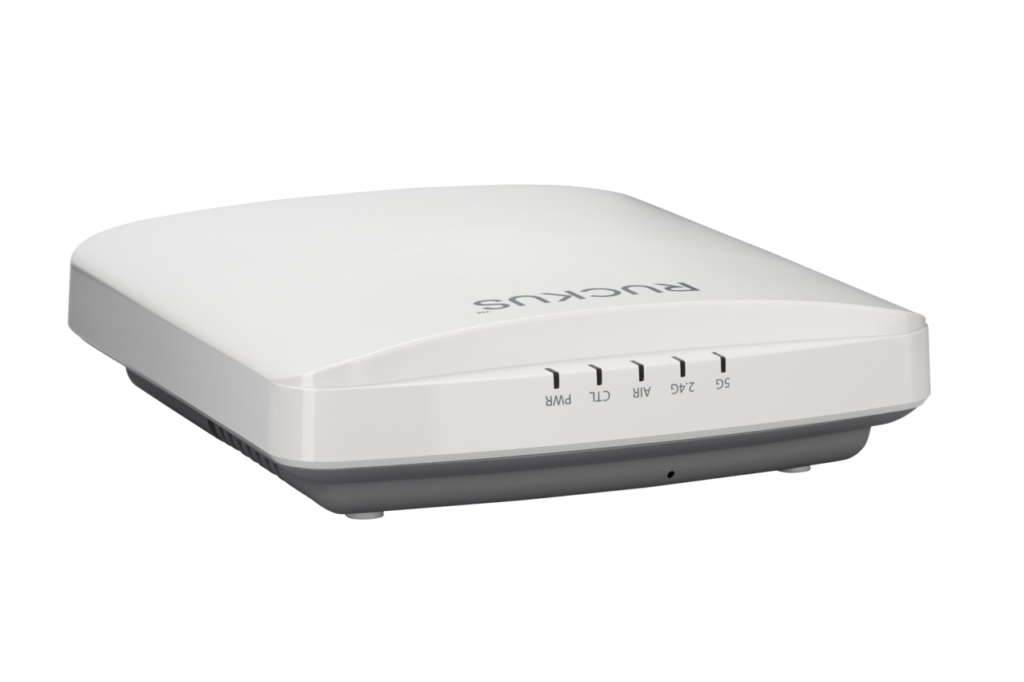
It handles a high client count, supports standalone operation as well as controller management, mounts on a ceiling, and can be powered over Ethernet or from a DC supply.
Choose it when reliability across a difficult building matters more than peak speed, in a busy office, a hall or a venue. Choose something else when the goal is the fastest possible link to a handful of modern devices in an ordinary room, because there the numbers on the sheet are what you will experience, and these ones are modest.
Category strengths
Where the Ruckus R550 beats the median
- More max concurrent clients ?512 vs 300 (median)
- Has ceiling mountable ?
- Has DC power option ?
Where the Ruckus R550 trails the median
- A much lower max wireless speed ?1,774 Mbps vs 4,988 Mbps (median)
- A much lower ethernet port speed ?1 Gbps vs 2.5 Gbps (median)
How this VS Score was computed
Score 36: each known spec is measured against the median of all access points (15 products), then weighted; 50 means level with that median. In classes of six or more, a value beyond the class’s 10th–90th percentile range counts as that limit, so one extreme product cannot set the scale. 63% of the scoreable weight could be used; unknown values, features not applicable to this class and proxies (battery capacity where a rated life exists) add or remove nothing.
| Specification | This product | Cohort median | Score weight | Points moved |
|---|---|---|---|---|
| Wi-Fi standard | Wi-Fi 6 | Wi-Fi 7 | 2 | −66.0 |
| Max wireless speed | 1,774 | 4,988 | 1.5 | −48.0 |
| 6 GHz band | No | 40% of the class have it | 0.8 | −38.4 |
| Max concurrent clients | 512 | 300 | 1 | +35.0 |
| Ethernet port speed | 1 | 2.5 | 1 | −30.0 |
| Standalone mode | Yes | 58% of the class have it | 0.5 | +25.0 |
| Ceiling mountable | Yes | 47% of the class have it | 0.3 | +15.0 |
| Outdoor rated | No | 40% of the class have it | 0.3 | −14.4 |
| DC power option | Yes | 46% of the class have it | 0.2 | +10.0 |
| Weight | 562 | 562 | 0.2 | +0.0 |
Not scored: Coverage area (unknown: not scored); MU-MIMO (standard for the class (100% have it)); PoE powered (standard for the class (100% have it)); Controller management (standard for the class (93% have it)); Seamless roaming (standard for the class (100% have it)); VLAN support (standard for the class (100% have it)); Guest network (standard for the class (100% have it)).
Editor’s note
Ruckus's current R550 data sheet, dated December 2025, still describes the access point of its November 2020 edition: Wi-Fi 6 on 2.4 and 5 GHz, two streams per band, up to 512 clients and a peak of 1,774 Mbps across both radios. In a market moving to Wi-Fi 7, its case rests on the antennas and the management around them.
Power decides how much of the R550 you get. On an 802.3af port it switches off its second Ethernet port, the onboard BLE and Zigbee radio and the USB port, and lowers transmit power. Full function needs 802.3at PoE+ at up to 18.71 W, or the 12 V supply that Ruckus sells separately. A buyer reusing an old PoE switch should check its class before counting on the IoT radio.
The R550 runs under a SmartZone controller, the older ZoneDirector, Ruckus's cloud, a controller-less mode for small sites, or on its own. It is plenum rated for installation above a drop ceiling and carries a limited lifetime warranty.
The adaptive antenna picks among 64 patterns per band, and that pays off in rooms crowded with clients, the classrooms and residence halls Ruckus aims it at, far more than in a house.
Against the R770, the gap is a generation. The R770 adds a third band and Wi-Fi 7 and wants 802.3bt power to run fully, so for a school extending an existing Ruckus Wi-Fi 6 network on PoE+ switches, the R550 is the model that fits the wiring already in the walls.
Specifications
Quality bars show where each figure sits between the lowest and highest of the 15 access points this VS Score is measured against.
Wireless
Ports & power
Management
Design
Networking assessment
What the specification table does not say on its own: what this device needs to connect, what speeds are realistic, what costs extra, and where it falls short. Every statement below is read from the verified sheet or written by an editor — nothing is estimated.
Test environment
Research-based assessment: this brief is derived from the manufacturer’s published specifications for the Ruckus R550 and the documents listed under Sources and verification. We have not run this unit on our own network, so nothing here is a measurement of ours.
Connection requirements
Powered over Ethernet (802.3at (PoE+), 18.71 W max (802.3af supported with reduced function)): the switch port or injector feeding it must supply that standard, or it will not start.
A DC power input is also available for locations without PoE.
It can run standalone without a controller, which suits a single-unit deployment.
The uplink is a 1 Gbps Ethernet port; the wired side of the network caps everything the access point can pass through.
Throughput expectations
The Wi-Fi 6 headline of 1,774 Mbps adds together the theoretical peak of every band. A single device connects to one band at a time, so no client ever sees the total, and real-world speeds run well below the link rate even in the same room.
There is no 6 GHz band, so the least congested spectrum available to new phones and laptops is not on offer here.
OFDMA and MU-MIMO help most when many devices are active at once; they do not make a single download faster.
Firmware and subscriptions
Ruckus's support page for the R550 recommends SmartZone 6.1.2 (LT-GD Patch 6) as the stability release and SmartZone 7.2.0 (LT-GA), with the AP 7.2.0 Patch 1, as the technology release. The same page carries release notes for the controller-less builds and the standalone (Solo) AP software, so the image to load depends on how the site is managed.
Security support
A guest network is available for visitors and smart-home devices, keeping them off the network your computers use.
VLAN support allows work, IoT and guest traffic to be separated on the wired side.
Security-update cadence is not something manufacturers publish as a specification; see Support and updates below.
Real-world household suitability
Rated for 512 connected devices — a marketing figure, but a useful indication of whether a home full of smart plugs, cameras and phones is within its design.
Known limitations
Not offered, according to the spec sheet: 6 GHz band, outdoor rated.
One specification is not published by the manufacturer and is shown as Unknown rather than guessed.
Support and updates
That page also holds the R550 quick setup guide, the access point SNMP reference and the ZoneDirector upgrade guide. Ruckus sells the R550 with a limited lifetime warranty, through authorized partners.
Sources and verification
Where the specifications come from
- Official product pageruckusnetworks.com
- Datasheet or manualwebresources.vistancenetworks.com
Verification
- First published
- Specifications last checked
- Sheet completeness
- 17 of 18 specifications verified; the rest show as Unknown and are never estimated or scored
- Page type
- Product specification page — Compiled from the manufacturer’s published specifications and the cited sources; this is not a hands-on test.
- Basis
- Research-based: specifications and editorial text were compiled from the documents listed here and the manufacturer’s published data. We have not tested this unit ourselves; where independent measurements are mentioned they belong to the linked publication.
Access Points with similar specs to the Ruckus R550

Ratings & reviews
No reviews yet. Be the first to share your experience.
The bottom line
The Ruckus R550 earns a VS Score of 36, below the median of the 15 access points it is measured against (a score of 50 is level with that median).
- Who it’s for
- Schools, residence halls and offices extending a Ruckus Wi-Fi 6 network on PoE+ switches, where client density and a lifetime warranty count for more than the newest band.
- Who should look elsewhere
- Anyone shopping for a tri-band or Wi-Fi 7 access point, and homes, where a consumer mesh kit is simpler to run and its adaptive antennas have little to fix.
- The trade-off that matters
- Ruckus's antenna system and management choices on a Wi-Fi 6 radio the rest of the market has moved past.
- The main alternative
- Ruckus R770: the same management options with tri-band Wi-Fi 7, if the switch can supply PoE++ power.
The VS Score is calculated from the weighted specifications above, each measured against the median of comparable access points — a shortlisting guide, not a substitute for your own priorities. See how we score.