TP-Link Omada Flex Bridge 5: Specs, Features, Pros & Cons
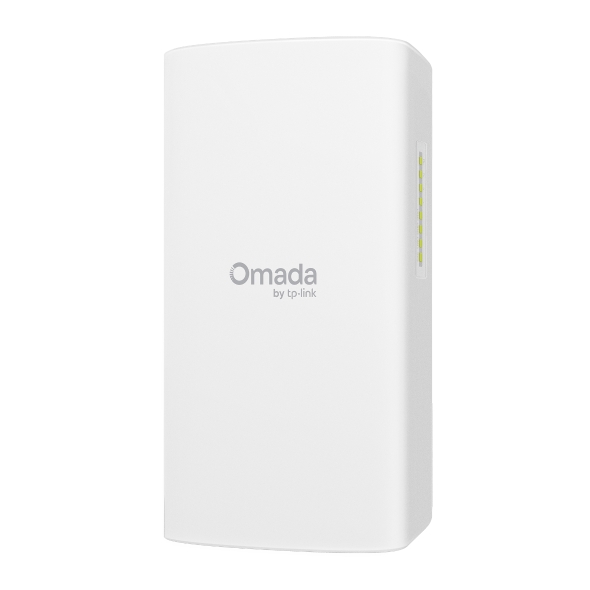
The Omada Flex Bridge 5 is an outdoor radio link with one purpose: getting the network to a building that no cable reaches. TP-Link rates it for several kilometers in clear line of sight, so a garage, barn, workshop or gate camera at the far end of a property can join the house network without anyone digging a trench.
One box holds one unit, and a point-to-point link takes two of them, one at each end. For serving several outbuildings from one place, the arrangement is different again, with multiple units talking back to a sector hub.
The detail that makes it practical is at the far end. Each unit carries three gigabit ports, two of which can supply power onward, so the bridge is able to run a camera or a small access point at the remote site without a separate power supply out there. Combined with its own ability to be powered over Ethernet, that can mean a single cable leaving the house and a working, powered network arriving at the far building.
The radio is deliberately old: Wi-Fi 5, one band, with a modest speed rating. For a link carrying cameras, a door entry system or general access to a workshop, that is entirely adequate, and the distance and stability matter far more than the headline figure.
It is rated for outdoor use, works standalone or under controller management, and supports VLANs so the remote site can be segmented from the main network. Judge it by the trench it saves rather than by any wireless specification, because that is the only comparison that makes sense.
Category strengths
Where the TP-Link Omada Flex Bridge 5 beats the median
- Has outdoor rated ?
- Has DC power option ?
Where the TP-Link Omada Flex Bridge 5 trails the median
- A much lower max wireless speed ?867 Mbps vs 4,988 Mbps (median)
- A much lower ethernet port speed ?1 Gbps vs 2.5 Gbps (median)
- A slightly heavier build ?590 g vs 562 g (median)
How this VS Score was computed
Score 24: each known spec is measured against the median of all access points (15 products), then weighted; 50 means level with that median. In classes of six or more, a value beyond the class’s 10th–90th percentile range counts as that limit, so one extreme product cannot set the scale. 55% of the scoreable weight could be used; unknown values, features not applicable to this class and proxies (battery capacity where a rated life exists) add or remove nothing.
| Specification | This product | Cohort median | Score weight | Points moved |
|---|---|---|---|---|
| Wi-Fi standard | Wi-Fi 5 | Wi-Fi 7 | 2 | −96.0 |
| Max wireless speed | 867 — capped at the class’s lower range (1,774) | 4,988 | 1.5 | −48.0 |
| 6 GHz band | No | 40% of the class have it | 0.8 | −38.4 |
| Ethernet port speed | 1 | 2.5 | 1 | −30.0 |
| Standalone mode | Yes | 58% of the class have it | 0.5 | +25.0 |
| Outdoor rated | Yes | 40% of the class have it | 0.3 | +15.0 |
| Ceiling mountable | No | 47% of the class have it | 0.3 | −14.4 |
| DC power option | Yes | 46% of the class have it | 0.2 | +10.0 |
| Weight | 590 | 562 | 0.2 | −0.4 |
Not scored: Coverage area (unknown: not scored); Max concurrent clients (unknown: not scored); MU-MIMO (standard for the class (100% have it)); PoE powered (standard for the class (100% have it)); Controller management (standard for the class (93% have it)); Seamless roaming (unknown: not scored); VLAN support (standard for the class (100% have it)); Guest network (unknown: not scored).
Editor’s note
The Omada Flex Bridge 5 does one narrow job: it carries a network across open air, up to a rated 5 km line-of-sight, so you don't have to trench cable to a detached garage, barn, workshop or gate camera. Understand one thing before buying, because this is a single unit. A working point-to-point link needs two of them, or several Flex units talking to a Sector Bridge 5 hub for point-to-multipoint.
What I like most about it is the far end. Each unit has three gigabit ports, and two of them supply PoE out (10 W on one port or 5 W each), which means the bridge itself can power a pair of IP cameras at the remote building. That folds an entire outdoor surveillance run into one PoE line from the house. DIP-switch pairing makes a two-unit link close to plug-and-play, and the IP66 housing plus pole and wall kits in the box handle the outdoor part. Power is flexible too: 802.3af/at, the included 54 V passive injector, or 12 V DC, which makes solar installs realistic.
The limitation to plan around is the radio. This is Wi-Fi 5 at 867 Mbps with gigabit ports, so real throughput lands well under a gigabit. That is completely fine for cameras, a workshop PC and smart-home gear, but this is not a multi-gig backhaul between buildings. That range rating also assumes clean line of sight, and trees and buildings shrink it fast.
It slots into Omada SDN (cloud, hardware or software controller) or runs standalone from the app, which makes it the natural pick if you already run Omada gear. If you don't, Ubiquiti's NanoBeam 5AC does the same job, with a steeper learning curve. For a camera-heavy outbuilding link, the built-in PoE out tips it TP-Link's way.
Specifications
Quality bars show where each figure sits between the lowest and highest of the 15 access points this VS Score is measured against.
Wireless
Ports & power
Management
Design
Networking assessment
What the specification table does not say on its own: what this device needs to connect, what speeds are realistic, what costs extra, and where it falls short. Every statement below is read from the verified sheet or written by an editor — nothing is estimated.
Test environment
Research-based assessment: this brief is derived from the manufacturer’s published specifications for the TP-Link Omada Flex Bridge 5 and the documents listed under Sources and verification. We have not run this unit on our own network, so nothing here is a measurement of ours.
Connection requirements
Powered over Ethernet (802.3af/at or 54V passive (adapter included)): the switch port or injector feeding it must supply that standard, or it will not start.
A DC power input is also available for locations without PoE.
It can run standalone without a controller, which suits a single-unit deployment.
The uplink is a 1 Gbps Ethernet port; the wired side of the network caps everything the access point can pass through.
Throughput expectations
The Wi-Fi 5 headline of 867 Mbps adds together the theoretical peak of every band. A single device connects to one band at a time, so no client ever sees the total, and real-world speeds run well below the link rate even in the same room.
There is no 6 GHz band, so the least congested spectrum available to new phones and laptops is not on offer here.
OFDMA and MU-MIMO help most when many devices are active at once; they do not make a single download faster.
Firmware and subscriptions
TP-Link's Omada support page lists one US hardware version of the Flex Bridge 5, V1.60, and notes that V1.0, V1.6 and V1.8 labels denote the same version. Two firmware releases have been posted so far, 1.0.2 in July 2026 and 1.0.33 (build 20260823) on 8 September 2026, each with its own release note. Bridges can be paired with the hardware DIP switch or adopted into an Omada controller, and TP-Link's guide to adding more units covers both routes.
Security support
VLAN support allows work, IoT and guest traffic to be separated on the wired side.
Security-update cadence is not something manufacturers publish as a specification; see Support and updates below.
Known limitations
Not offered, according to the spec sheet: 6 GHz band, ceiling mountable.
4 specifications are not published by the manufacturer and are shown as Unknown rather than guessed.
Support and updates
The support page groups the Flex Bridge 5 documents into a datasheet, hardware installation guide, reference guide and knowledgebase articles, with firmware, GPL code and MIB files under downloads and security-vulnerability and end-of-life notices under bulletins. Configuration guides on the page cover point-to-multipoint links and bridge setups on networks without a DHCP server, which are the situations this kind of product is usually bought for.
Sources and verification
Where the specifications come from
- Official product pageomadanetworks.com
- Support and firmware documentationsupport.omadanetworks.com
- Retailer listing (cross-check)amazon.com
Verification
- First published
- Specifications last checked
- Sheet completeness
- 14 of 18 specifications verified; the rest show as Unknown and are never estimated or scored
- Page type
- Product specification page — Compiled from the manufacturer’s published specifications and the cited sources; this is not a hands-on test.
- Basis
- Research-based: specifications and editorial text were compiled from the documents listed here and the manufacturer’s published data. We have not tested this unit ourselves; where independent measurements are mentioned they belong to the linked publication.
Access Points with similar specs to the TP-Link Omada Flex Bridge 5

Ratings & reviews
No reviews yet. Be the first to share your experience.
The bottom line
The TP-Link Omada Flex Bridge 5 earns a VS Score of 24, below the median of the 15 access points it is measured against (a score of 50 is level with that median).
- Who it’s for
- Anyone linking a detached garage, workshop, barn or gate to the house network without trenching cable, and camera installs above all, since its two PoE-out ports can power IP cameras at the far end directly. Anyone already running Omada gets controller integration as a bonus.
- Who should look elsewhere
- Anyone who needs multi-gig speed between buildings, because a Wi-Fi 5 radio behind gigabit ports keeps real throughput well under 1 Gbps. Also not for links without clean line of sight, since the rated range assumes open air.
- The trade-off that matters
- A working link always takes two units, and what the pair gives you is convenience (DIP-switch pairing, PoE flexibility, a weatherproof housing) rather than speed.
- The main alternative
- Ubiquiti NanoBeam 5AC Gen2: the same point-to-point job for a site already running Ubiquiti's airMAX gear, if you don't need PoE-out at the remote end and don't mind its steeper setup.
The VS Score is calculated from the weighted specifications above, each measured against the median of comparable access points — a shortlisting guide, not a substitute for your own priorities. See how we score.