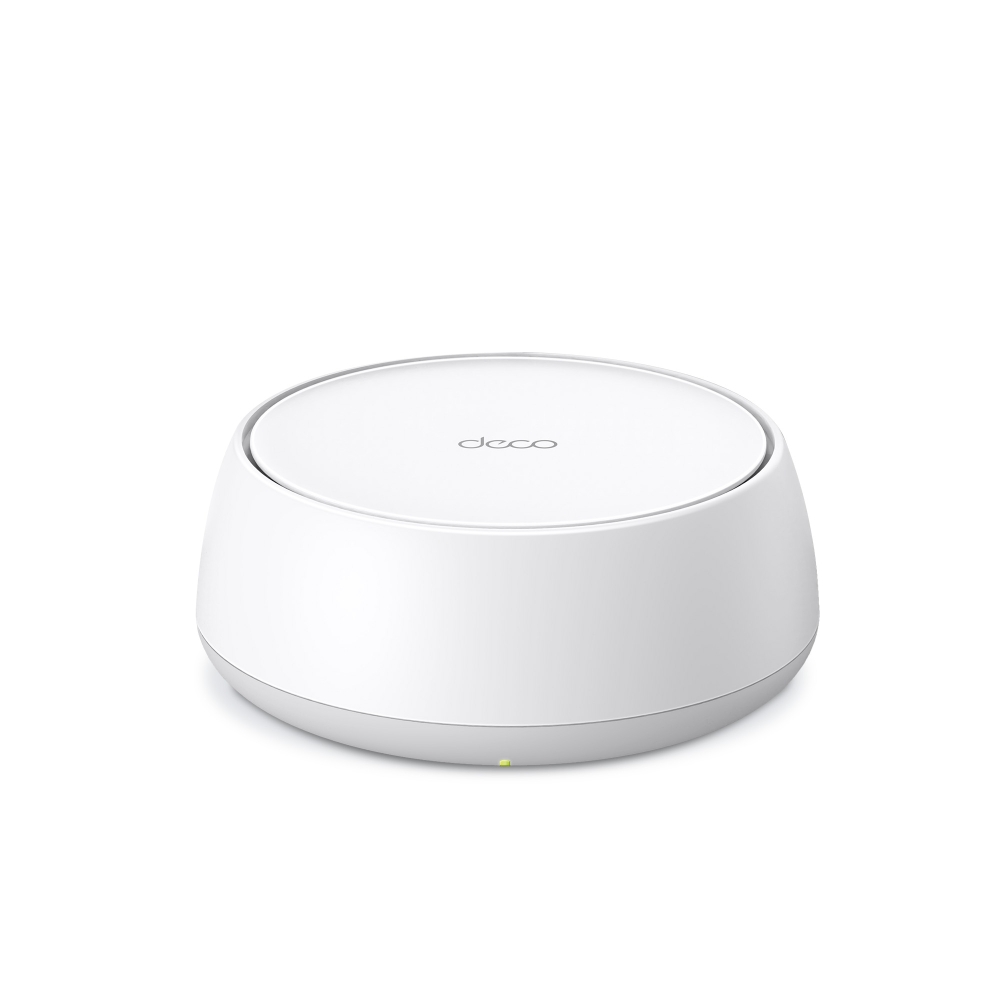
TP-Link Deco BE25: Specs, Features, Pros & Cons
The Deco BE25 is sold as a mesh system but arrives as a single unit, which makes it less a kit than a starting point: one node now, more added later as a house demands them. That framing matters, because a single unit covers a modest area, and the rated figure assumes exactly one.
Each node's back panel is the reason to consider it. Two 2.5 Gbps auto-sensing ports per unit means the node can be fed from a faster-than-gigabit connection and still leave a fast socket for a console, a NAS or a switch. Budget mesh hardware almost always fits one gigabit WAN and one gigabit LAN instead, and that limitation outlives any wireless fashion.
The wireless specification needs reading carefully. This carries the Wi-Fi 7 name with two bands and no 6 GHz radio, so the clean wide channels most associated with the standard are not part of it. What remains are the efficiency features working across 2.4 and 5 GHz, which help in a crowded building but are not the reason people upgrade generations.
Wired backhaul is supported, which is worth planning for: if Ethernet can reach the second node, this system performs far better than its radio specification suggests, because the link between units stops competing with client traffic.
For an apartment or a small house on fast broadband, wanting decent wired ports and the option to grow, the trade-offs land reasonably. For a large home expecting mesh to solve coverage wirelessly, a tri-band system with a dedicated backhaul band will do a job this cannot.
Category strengths
Where the TP-Link Deco BE25 beats the median
- Has built-in security suite ?
Where the TP-Link Deco BE25 trails the median
- A much lower coverage area ?2,600 sq ft vs 6,500 sq ft (median)
- No tri-band ?
- No 6 GHz band ?
- A much lower units included ?1 vs 2.5 (median)
- A lower ethernet ports per unit ?2 vs 3 (median)
- Fewer max connected devices ?150 vs 200 (median)
- A slightly lower max wireless speed ?5,012 Mbps vs 5,360 Mbps (median)
How this VS Score was computed
Score 34: each known spec is measured against the median of all mesh wi-fi systems (16 products), then weighted; 50 means level with that median. In classes of six or more, a value beyond the class’s 10th–90th percentile range counts as that limit, so one extreme product cannot set the scale. 75% of the scoreable weight could be used; unknown values, features not applicable to this class and proxies (battery capacity where a rated life exists) add or remove nothing.
| Specification | This product | Cohort median | Score weight | Points moved |
|---|---|---|---|---|
| Coverage area | 2,600 | 6,500 | 2 | −60.0 |
| Tri-band | No | 73% of the class have it | 1 | −48.0 |
| Dedicated wireless backhaul | No | 33% of the class have it | 1 | −48.0 |
| Multi-gig WAN | Yes | 75% of the class have it | 0.8 | +40.0 |
| 6 GHz band | No | 69% of the class have it | 0.8 | −38.4 |
| Built-in security suite | Yes | 44% of the class have it | 0.5 | +25.0 |
| Units included | 1 | 2.5 | 0.8 | −24.0 |
| Ethernet ports per unit | 2 | 3 | 1 | −17.0 |
| USB port | No | 38% of the class have it | 0.2 | −9.6 |
| Max connected devices | 150 | 200 | 0.5 | −6.0 |
| Max wireless speed | 5,012 | 5,360 | 1.5 | −4.5 |
| Wi-Fi standard | Wi-Fi 7 | Wi-Fi 7 | 2 | +0.0 |
Not scored: Wired backhaul support (standard for the class (100% have it)); WPA3 (standard for the class (100% have it)); App control (standard for the class (100% have it)); Parental controls (standard for the class (100% have it)); Quality of Service (QoS) (standard for the class (92% have it)); Guest network (standard for the class (100% have it)); Smart home hub (unknown: not scored); Unit weight (unknown: not scored).
Editor’s note
TP-Link's US spec table lists a 320 MHz channel among the Deco BE25's Wi-Fi 7 features, which cannot apply to a router without a 6 GHz radio, because channels that wide exist only at 6 GHz. The datasheet's footnote gives the real width, 240 MHz on the 5 GHz band, and that channel accounts for the BE5000 name. In the UK, TP-Link sells the same model as a BE3600 system, rated 2,882 Mbps at 5 GHz, the figure for a 160 MHz channel.
The 5 GHz radio's 4,324 Mbps rating needs a phone or laptop that supports the wider channel. A client without it connects much as it would to a good Wi-Fi 6 router, and the gain shrinks to Multi-Link Operation and better efficiency in a crowded building.
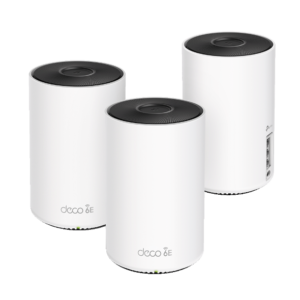
Every node can take a faster-than-gigabit internet feed or a multi-gig cable to the next node, and TP-Link's 150-device rating covers an apartment full of smart plugs and speakers with room to spare. The puck-shaped nodes are 62 mm tall, low enough for a TV stand or the gap under a shelf where TP-Link's taller Deco cylinders would not fit.
Basic HomeShield protection, parental controls and device QoS are included, and the stronger protection features need TP-Link's paid plan.
I'd treat it as a low-cost way into TP-Link's Wi-Fi 7 mesh for a home that can wire at least one node. Once the household's phones and laptops can use 6 GHz, the Deco BE63 is the step up that adds the band this kit leaves out.
Specifications
Quality bars show where each figure sits between the lowest and highest of the 16 mesh wi-fi systems this VS Score is measured against.
Wireless
Ports & backhaul
Features & security
Design
Networking assessment
What the specification table does not say on its own: what this device needs to connect, what speeds are realistic, what costs extra, and where it falls short. Every statement below is read from the verified sheet or written by an editor — nothing is estimated.
Test environment
Research-based assessment: this brief is derived from the manufacturer’s published specifications for the TP-Link Deco BE25 and the documents listed under Sources and verification. We have not run this unit on our own network, so nothing here is a measurement of ours.
Connection requirements
The pack contains 1 units; the main unit plugs into your modem or existing gateway and the rest are placed around the home.
Wired backhaul is supported: running Ethernet between the units gives every satellite the full speed of the main unit.
Throughput expectations
The Wi-Fi 7 headline of 5,012 Mbps adds together the theoretical peak of every band. A single device connects to one band at a time, so no client ever sees the total, and real-world speeds run well below the link rate even in the same room.
There is no 6 GHz band, so the least congested spectrum available to new phones and laptops is not on offer here.
Firmware and subscriptions
TP-Link lists firmware for hardware V1 and V1.60, most recently 1.1.8, published July 14, 2026, which added manual wireless channel selection and security fixes. Updates install through the Deco app.
A built-in security suite is on the spec sheet. On most brands the full version is a paid subscription after a trial; check the manufacturer’s page linked under Sources for the current terms.
Set-up and management run through the manufacturer’s app; check whether a local web interface is offered as well.
Parental controls are listed; on several brands the scheduling and filtering tiers sit behind the same subscription as the security suite.
Security support
WPA3 is supported, the current Wi-Fi encryption standard; devices that only speak WPA2 still connect in mixed mode.
A guest network is available for visitors and smart-home devices, keeping them off the network your computers use.
Security-update cadence is not something manufacturers publish as a specification; see Support and updates below.
Real-world household suitability
The manufacturer rates coverage at 2,600 sq ft. That figure assumes open space; brick, concrete and floors reduce it, and a large or multi-storey home is usually better served by a mesh system than by one router.
Rated for 150 connected devices — a marketing figure, but a useful indication of whether a home full of smart plugs, cameras and phones is within its design.
Known limitations
Not offered, according to the spec sheet: tri-band, dedicated wireless backhaul, 6 GHz band, uSB port.
2 specifications are not published by the manufacturer and are shown as Unknown rather than guessed.
Support and updates
The US support page links the datasheet, the V1.6 user guide, Deco FAQs, the TP-Link Community forum and TP-Link's technical-support and warranty pages.
Sources and verification
Where the specifications come from
- Official product pagetp-link.com
- Datasheet or manualstatic.tp-link.com
- Support and firmware documentationtp-link.com
- Independent testingrtings.com
Verification
- First published
- Specifications last checked
- Sheet completeness
- 19 of 21 specifications verified; the rest show as Unknown and are never estimated or scored
- Page type
- Product specification page — Compiled from the manufacturer’s published specifications and the cited sources; this is not a hands-on test.
- Basis
- Research-based: specifications and editorial text were compiled from the documents listed here and the manufacturer’s published data. We have not tested this unit ourselves; where independent measurements are mentioned they belong to the linked publication.
Mesh Wi-Fi Systems with similar specs to the TP-Link Deco BE25

Ratings & reviews
No reviews yet. Be the first to share your experience.
The bottom line
The TP-Link Deco BE25 earns a VS Score of 34, below the median of the 16 mesh wi-fi systems it is measured against (a score of 50 is level with that median).
- Who it’s for
- An apartment or smaller house on a plan just above a gigabit, where one or two low nodes and a single Ethernet run to the far one will cover it.
- Who should look elsewhere
- Homes whose phones and laptops already use 6 GHz, and large houses that must cover long distances wirelessly with no cable between nodes.
- The trade-off that matters
- Two radios do everything, so a wirelessly linked node shares its airtime between your devices and the mesh link. It performs best with at least one node wired.
- The main alternative
- TP-Link Deco BE63: adds a 6 GHz radio and twice the multi-gig sockets per node, for households whose devices can use the newer band.
The VS Score is calculated from the weighted specifications above, each measured against the median of comparable mesh wi-fi systems — a shortlisting guide, not a substitute for your own priorities. See how we score.