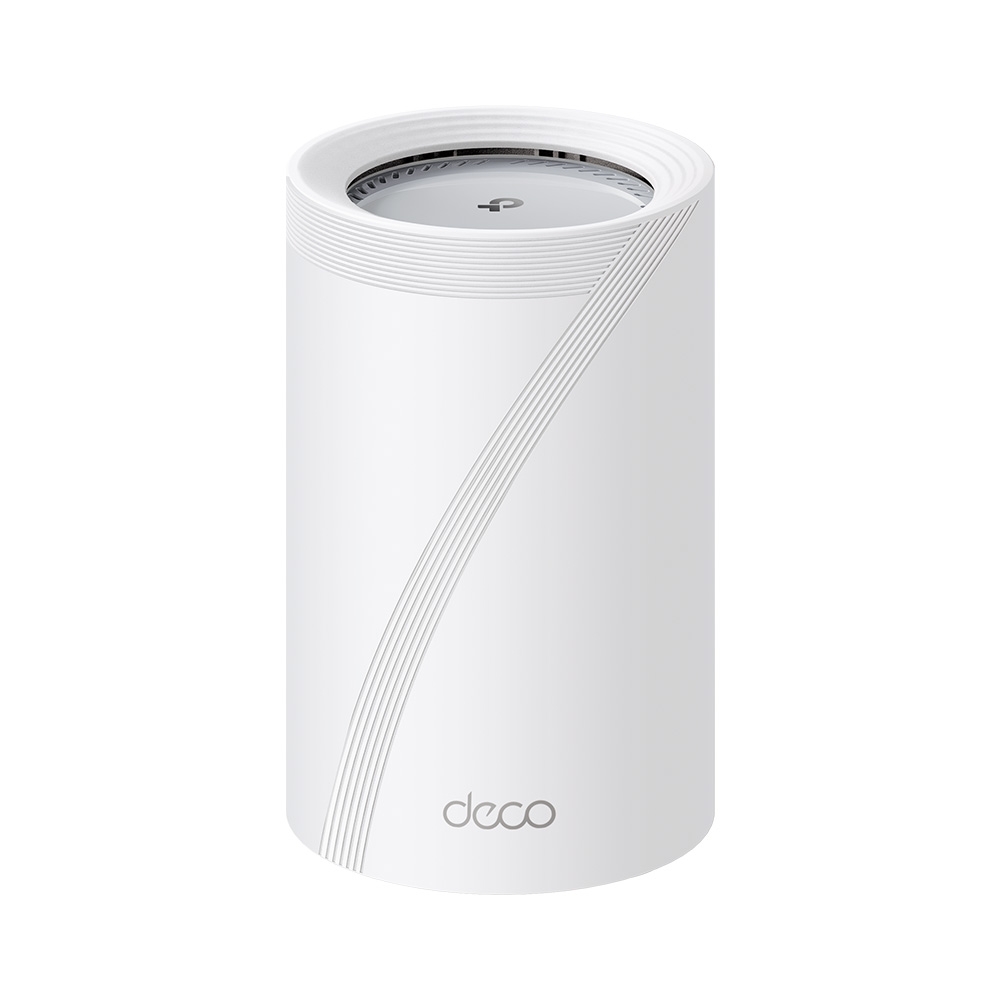
TP-Link Deco BE65 Pro: Specs, Features, Pros & Cons
Every socket on a Deco BE65 Pro node faces whichever direction you need. Two 5 Gbps ports and a 2.5 Gbps port, all auto-sensing WAN or LAN, means the fast pair can take an internet feed at one node and serve a NAS at another without any of the usual planning about which unit gets which cable.
That flexibility, plus 5 Gbps itself, is what the Pro suffix actually buys. Most mesh hardware anywhere near this money stops at 2.5 Gbps, and the systems that do go faster generally cost considerably more per node. Underneath sits a genuine tri-band Wi-Fi 7 unit with a real 6 GHz radio, rated for three thousand square feet and a couple of hundred devices per node, with a USB port and support for wired backhaul between units.
Two things temper the picture. It ships as a single unit, so covering a larger house means buying more, and the coverage figure is per node rather than for a system. And the security software follows the industry's least popular trend: the protection features are trialled and then metered, so the long-term cost of the system is not the number on the box.
Wired backhaul deserves a mention because it changes the maths. If Ethernet can reach a second node, this system stops splitting airtime between clients and inter-node traffic, and a tri-band unit with 5 Gbps ports becomes considerably more capable than its radio rating suggests.
For a household with fast broadband and some cabling already in the walls, it is one of the more sensible ways into Wi-Fi 7 mesh, provided the subscription question is settled before buying rather than after the trial lapses.
Category strengths
Where the TP-Link Deco BE65 Pro beats the median
- A much higher max wireless speed ?10,777 Mbps vs 5,320 Mbps (median)
- Has USB port ?
Where the TP-Link Deco BE65 Pro trails the median
- A much lower coverage area ?3,000 sq ft vs 6,000 sq ft (median)
- A much lower units included ?1 vs 2 (median)
How this VS Score was computed
Score 61: each known spec is measured against the median of all mesh wi-fi systems (17 products), then weighted. 69% of the scoreable weight could be used. See how we score
| Specification | This product | Cohort median | Score weight | Points moved |
|---|---|---|---|---|
| Max wireless speed | 10,777 | 5,320 | 1.5 | +75.0 |
| Coverage area | 3,000 | 6,000 | 2 | −50.0 |
| Tri-band | Yes | 69% of the class have it | 1 | +50.0 |
| 6 GHz band | Yes | 65% of the class have it | 0.8 | +40.0 |
| Multi-gig WAN | Yes | 71% of the class have it | 0.8 | +40.0 |
| Security suite, no subscription | No | 24% of the class have it | 0.5 | −24.0 |
| Units included | 1 | 2 | 0.8 | −20.0 |
| USB port | Yes | 35% of the class have it | 0.2 | +10.0 |
| Wi-Fi standard | Wi-Fi 7 | Wi-Fi 7 | 2 | +0.0 |
| Max connected devices | 200 | 200 | 0.5 | +0.0 |
| Ethernet ports per unit | 3 | 3 | 1 | +0.0 |
Not scored: Dedicated wireless backhaul (unknown: not scored); Wired backhaul support (standard for the class (100% have it)); WPA3 (standard for the class (100% have it)); App control (standard for the class (100% have it)); Parental controls (standard for the class (100% have it)); Quality of Service (QoS) (standard for the class (100% have it)); Guest network (standard for the class (100% have it)); Smart home hub (unknown: not scored); Unit weight (unknown: not scored).
Editor’s note
The BE11000 in the Deco BE65 Pro's US name adds its 6 GHz, 5 GHz and 2.4 GHz radios together. The footnote in TP-Link's datasheet gives the more useful number: a Wi-Fi 7 laptop that supports Multi-Link Operation and the 6 GHz band can reach up to 10 Gbps by combining its 5 GHz and 6 GHz links. A client without MLO uses one band at a time.
With two streams on every radio, a single fast client depends on the 320 MHz channel at 6 GHz for its speed, and a node has less spare capacity than a four-stream design when many busy devices crowd onto it.
The eero Pro 7 is built the same way, with a pair of 5 Gbps ports and two-stream radios on every band. eero adds a Thread, Zigbee and Matter hub and its hands-off app. TP-Link adds a third multi-gig socket and HomeShield, whose stronger tools sit behind a paid plan, just as eero's sit behind eero Plus.
Within the Deco range, the BE67 replaces the pair of 5 Gbps sockets with a single ten-gigabit port plus two slower ones, and adds a faster 6 GHz radio. That only pays off on a plan or a NAS faster than 5 Gbps.
Specifications
Wireless
Ports & backhaul
Features & security
Design
Networking assessment
Connection requirements
The pack contains 1 units; the main unit plugs into your modem or existing gateway and the rest are placed around the home.
Wired backhaul is supported: running Ethernet between the units gives every satellite the full speed of the main unit.
Throughput expectations
The Wi-Fi 7 headline of 10,777 Mbps adds together the theoretical peak of every band. A single device connects to one band at a time, so no client ever sees the total, and real-world speeds run well below the link rate even in the same room.
The 6 GHz band is only usable by Wi-Fi 6E or Wi-Fi 7 clients and has noticeably shorter range through walls; older devices stay on the 5 GHz and 2.4 GHz bands.
Firmware and subscriptions
TP-Link's US firmware list for hardware V1.6 runs to 1.3.1, published May 27, 2026, which added Hybrid Mesh, Internet Backup, DNS over HTTPS and TLS, a fixed WAN port option and per-device speed limits. The Deco app installs updates over the air.
Set-up and management run through the manufacturer’s app; check whether a local web interface is offered as well.
Parental controls are listed; on several brands the scheduling and filtering tiers sit behind the same subscription as the security suite.
Security support
WPA3 is supported, the current Wi-Fi encryption standard; devices that only speak WPA2 still connect in mixed mode.
A guest network is available for visitors and smart-home devices, keeping them off the network your computers use.
Security-update cadence is not something manufacturers publish as a specification; see Support and updates below.
Real-world household suitability
The manufacturer rates coverage at 3,000 sq ft. That figure assumes open space; brick, concrete and floors reduce it, and a large or multi-storey home is usually better served by a mesh system than by one router.
Rated for 200 connected devices — a marketing figure, but a useful indication of whether a home full of smart plugs, cameras and phones is within its design.
Known limitations
Not offered, according to the spec sheet: security suite, no subscription.
3 specifications are not published by the manufacturer and are shown as Unknown rather than guessed.
Support and updates
The BE65 Pro support page links the US datasheet and user guide, the Deco app guide, FAQs, the TP-Link Community forum and TP-Link's technical-support and warranty pages.
Sources and verification
Where the specifications come from
- Official product pagetp-link.com
Verification
- First published
- Specifications last checked
- Sheet completeness
- 18 of 21 specifications verified; the rest show as Unknown and are never estimated or scored
- Page type
- Product specification page — Compiled from the manufacturer’s published specifications and the cited sources; this is not a hands-on test.
- Basis
- Research-based: specifications and editorial text were compiled from the documents listed here and the manufacturer’s published data. We have not tested this unit ourselves; where independent measurements are mentioned they belong to the linked publication.
Mesh Wi-Fi Systems with similar specs to the TP-Link Deco BE65 Pro

Ratings & reviews
No reviews yet. Write the first one
The bottom line
The TP-Link Deco BE65 Pro earns a VS Score of 61, above the median of the 17 mesh wi-fi systems it is measured against (a score of 50 is level with that median).
- Who it’s for
- A home on multi-gig fiber with Ethernet between rooms, where two nodes linked by a fast cable leave every radio free for phones and laptops.
- Who should look elsewhere
- Households that want the router to double as a smart-home hub, and busy homes expecting flagship four-stream capacity from a single node.
- The trade-off that matters
- Its multi-gig ports outclass its radios: two streams per band keep one laptop fast on 6 GHz but give a crowded room less headroom than a four-stream flagship.
- The main alternative
- eero Pro 7: the same pair of 5 Gbps ports, better suited to a household already run through Alexa.
This page was created with the help of AI. How we work